Road Signage
Road signage is considered an “actor” in Virtual Self-Driving Car Studio. The road signage library controls the road signage available to be placed in the QLabs environment. Road signage can be spawned anywhere in the Open Worlds.
See the Road Signage Tutorial to get a better understanding of using road signage in Quanser Interactive Labs.
Crosswalk
Library
Constants
- QLabsCrosswalk.ID_CROSSWALK = 10010
Class ID
Member Variables
- QLabsCrosswalk.actorNumber = None
The current actor number of this class to be addressed. This will be set by spawn methods and cleared by destroy methods. It will not be modified by the destroy all actors. This can be manually altered at any time to use one object to address multiple actors.
Methods
- QLabsCrosswalk.spawn(location=[0, 0, 0], rotation=[0, 0, 0], scale=[1, 1, 1], configuration=0, waitForConfirmation=True)
Spawns a new actor with the next available actor number within this class.
- Parameters
location (float array[3]) – (Optional) An array of floats for x, y and z coordinates
rotation (float array[3]) – (Optional) An array of floats for the roll, pitch, and yaw in radians
scale (float array[3]) – (Optional) An array of floats for the scale in the x, y, and z directions. Scale values of 0.0 should not be used.
configuration (uint32) – (Optional) Spawn configuration. See class library for configuration options.
waitForConfirmation (boolean) – (Optional) Make this operation blocking until confirmation of the spawn has occurred. Note that if this is False, the returned actor number will be invalid.
- Returns
status - 0 if successful, 1 class not available, 3 unknown error, -1 communications error.
actorNumber - An actor number to use for future references.
- Return type
int32, int32
- QLabsCrosswalk.spawn_degrees(location=[0, 0, 0], rotation=[0, 0, 0], scale=[1, 1, 1], configuration=0, waitForConfirmation=True)
Spawns a new actor with the next available actor number within this class.
- Parameters
location (float array[3]) – (Optional) An array of floats for x, y and z coordinates
rotation (float array[3]) – (Optional) An array of floats for the roll, pitch, and yaw in degrees
scale (float array[3]) – (Optional) An array of floats for the scale in the x, y, and z directions. Scale values of 0.0 should not be used.
configuration (uint32) – (Optional) Spawn configuration. See class library for configuration options.
waitForConfirmation (boolean) – (Optional) Make this operation blocking until confirmation of the spawn has occurred. Note that if this is False, the returned actor number will be invalid.
- Returns
status - 0 if successful, 1 class not available, 3 unknown error, -1 communications error.
actorNumber - An actor number to use for future references.
- Return type
int32, int32
- QLabsCrosswalk.spawn_id(actorNumber, location=[0, 0, 0], rotation=[0, 0, 0], scale=[1, 1, 1], configuration=0, waitForConfirmation=True)
Spawns a new actor.
- Parameters
actorNumber (uint32) – User defined unique identifier for the class actor in QLabs
location (float array[3]) – (Optional) An array of floats for x, y and z coordinates
rotation (float array[3]) – (Optional) An array of floats for the roll, pitch, and yaw in radians
scale (float array[3]) – (Optional) An array of floats for the scale in the x, y, and z directions. Scale values of 0.0 should not be used.
configuration (uint32) – (Optional) Spawn configuration. See class library for configuration options.
waitForConfirmation (boolean) – (Optional) Make this operation blocking until confirmation of the spawn has occurred.
- Returns
status - 0 if successful, 1 class not available, 2 actor number not available or already in use, 3 unknown error, -1 communications error
- Return type
int32
- QLabsCrosswalk.spawn_id_degrees(actorNumber, location=[0, 0, 0], rotation=[0, 0, 0], scale=[1, 1, 1], configuration=0, waitForConfirmation=True)
Spawns a new actor.
- Parameters
actorNumber (uint32) – User defined unique identifier for the class actor in QLabs
location (float array[3]) – (Optional) An array of floats for x, y and z coordinates
rotation (float array[3]) – (Optional) An array of floats for the roll, pitch, and yaw in radians
scale (float array[3]) – (Optional) An array of floats for the scale in the x, y, and z directions. Scale values of 0.0 should not be used.
configuration (uint32) – (Optional) Spawn configuration. See class library for configuration options.
waitForConfirmation (boolean) – (Optional) Make this operation blocking until confirmation of the spawn has occurred.
- Returns
status - 0 if successful, 1 class not available, 2 actor number not available or already in use, 3 unknown error, -1 communications error
- Return type
int32
- QLabsCrosswalk.spawn_id_and_parent_with_relative_transform(actorNumber, location=[0, 0, 0], rotation=[0, 0, 0], scale=[1, 1, 1], configuration=0, parentClassID=0, parentActorNumber=0, parentComponent=0, waitForConfirmation=True)
Spawns a new actor relative to an existing actor and creates a kinematic relationship.
- Parameters
actorNumber (uint32) – User defined unique identifier for the class actor in QLabs
location (float array[3]) – (Optional) An array of floats for x, y and z coordinates
rotation (float array[3]) – (Optional) An array of floats for the roll, pitch, and yaw in radians
scale (float array[3]) – (Optional) An array of floats for the scale in the x, y, and z directions. Scale values of 0.0 should not be used.
configuration (uint32) – (Optional) Spawn configuration. See class library for configuration options.
parentClassID (uint32) – See the ID variables in the respective library classes for the class identifier
parentActorNumber (uint32) – User defined unique identifier for the class actor in QLabs
parentComponent (uint32) – 0 for the origin of the parent actor, see the parent class for additional reference frame options
waitForConfirmation (boolean) – (Optional) Make this operation blocking until confirmation of the spawn has occurred.
- Returns
status - 0 if successful, 1 class not available, 2 actor number not available or already in use, 3 cannot find the parent actor, 4 unknown error, -1 communications error
- Return type
int32
- QLabsCrosswalk.spawn_id_and_parent_with_relative_transform_degrees(actorNumber, location=[0, 0, 0], rotation=[0, 0, 0], scale=[1, 1, 1], configuration=0, parentClassID=0, parentActorNumber=0, parentComponent=0, waitForConfirmation=True)
Spawns a new actor relative to an existing actor and creates a kinematic relationship.
- Parameters
actorNumber (uint32) – User defined unique identifier for the class actor in QLabs
location (float array[3]) – (Optional) An array of floats for x, y and z coordinates
rotation (float array[3]) – (Optional) An array of floats for the roll, pitch, and yaw in degrees
scale (float array[3]) – (Optional) An array of floats for the scale in the x, y, and z directions. Scale values of 0.0 should not be used.
configuration (uint32) – (Optional) Spawn configuration. See class library for configuration options.
parentClassID (uint32) – See the ID variables in the respective library classes for the class identifier
parentActorNumber (uint32) – User defined unique identifier for the class actor in QLabs
parentComponent (uint32) – 0 for the origin of the parent actor, see the parent class for additional reference frame options
waitForConfirmation (boolean) – (Optional) Make this operation blocking until confirmation of the spawn has occurred.
- Returns
status - 0 if successful, 1 class not available, 2 actor number not available or already in use, 3 cannot find the parent actor, 4 unknown error, -1 communications error
- Return type
int32
- QLabsCrosswalk.destroy()
Find and destroy a specific actor. This is a blocking operation.
- Returns
numActorsDestroyed - The number of actors destroyed. -1 if failed.
- Return type
int32
- QLabsCrosswalk.destroy_all_actors_of_class()
Find and destroy all actors of this class. This is a blocking operation.
- Returns
numActorsDestroyed - The number of actors destroyed. -1 if failed.
- Return type
int32
- QLabsCrosswalk.ping()
Checks if the actor is still present in the environment. Note that if you did not spawn the actor with one of the spawn functions, you may need to manually set the actorNumber member variable.
- Returns
status - True if successful, False otherwise
- Return type
boolean
- QLabsCrosswalk.get_world_transform()
Get the location, rotation, and scale in world coordinates of the actor.
- Returns
status - True if successful, False otherwise
location
rotation
scale
- Return type
boolean, float array[3], float array[3], float array[3]
- QLabsCrosswalk.get_world_transform_degrees()
Get the location, rotation, and scale in world coordinates of the actor.
- Returns
status - True if successful, False otherwise
location
rotation
scale
- Return type
boolean, float array[3], float array[3], float array[3]
- QLabsCrosswalk.parent_with_relative_transform(location=[0, 0, 0], rotation=[0, 0, 0], scale=[1, 1, 1], parentClassID=0, parentActorNumber=0, parentComponent=0, waitForConfirmation=True)
Parents one existing actor to another to create a kinematic relationship.
- Parameters
location (float array[3]) – (Optional) An array of floats for x, y and z coordinates
rotation (float array[3]) – (Optional) An array of floats for the roll, pitch, and yaw in radians
scale (float array[3]) – (Optional) An array of floats for the scale in the x, y, and z directions. Scale values of 0.0 should not be used.
parentClassID (uint32) – See the ID variables in the respective library classes for the class identifier
parentActorNumber (uint32) – User defined unique identifier for the class actor in QLabs
parentComponent (uint32) – 0 for the origin of the parent actor, see the parent class for additional reference frame options
waitForConfirmation (boolean) – (Optional) Make this operation blocking until confirmation of the spawn has occurred.
- Returns
status - 0 if successful, 1 cannot find this actor, 2 cannot find the parent actor, 3 unknown error, -1 communications error
- Return type
int32
- QLabsCrosswalk.parent_with_relative_transform_degrees(location=[0, 0, 0], rotation=[0, 0, 0], scale=[1, 1, 1], parentClassID=0, parentActorNumber=0, parentComponent=0, waitForConfirmation=True)
Parents one existing actor to another to create a kinematic relationship.
- Parameters
location (float array[3]) – (Optional) An array of floats for x, y and z coordinates
rotation (float array[3]) – (Optional) An array of floats for the roll, pitch, and yaw in degrees
scale (float array[3]) – (Optional) An array of floats for the scale in the x, y, and z directions. Scale values of 0.0 should not be used.
parentClassID (uint32) – See the ID variables in the respective library classes for the class identifier
parentActorNumber (uint32) – User defined unique identifier for the class actor in QLabs
parentComponent (uint32) – 0 for the origin of the parent actor, see the parent class for additional reference frame options
waitForConfirmation (boolean) – (Optional) Make this operation blocking until confirmation of the spawn has occurred.
- Returns
status - 0 if successful, 1 cannot find this actor, 2 cannot find the parent actor, 3 unknown error, -1 communications error
- Return type
int32
- QLabsCrosswalk.parent_with_current_world_transform(parentClassID=0, parentActorNumber=0, parentComponent=0, waitForConfirmation=True)
Parents one existing actor to another to create a kinematic relationship while preserving the current world transform of the child actor.
- Parameters
parentClassID (uint32) – See the ID variables in the respective library classes for the class identifier
parentActorNumber (uint32) – User defined unique identifier for the class actor in QLabs
parentComponent (uint32) – 0 for the origin of the parent actor, see the parent class for additional reference frame options
waitForConfirmation (boolean) – (Optional) Make this operation blocking until confirmation of the spawn has occurred.
- Returns
status - 0 if successful, 1 cannot find this actor, 2 cannot find the parent actor, 3 unknown error, -1 communications error
- Return type
int32
- QLabsCrosswalk.parent_break(waitForConfirmation=True)
Breaks any relationship with a parent actor (if it exists) and preserves the current world transform
- Parameters
waitForConfirmation (boolean) – (Optional) Make this operation blocking until confirmation of the spawn has occurred.
- Returns
status - 0 if successful, 1 cannot find this actor, -1 communications error
- Return type
int32
Configurations
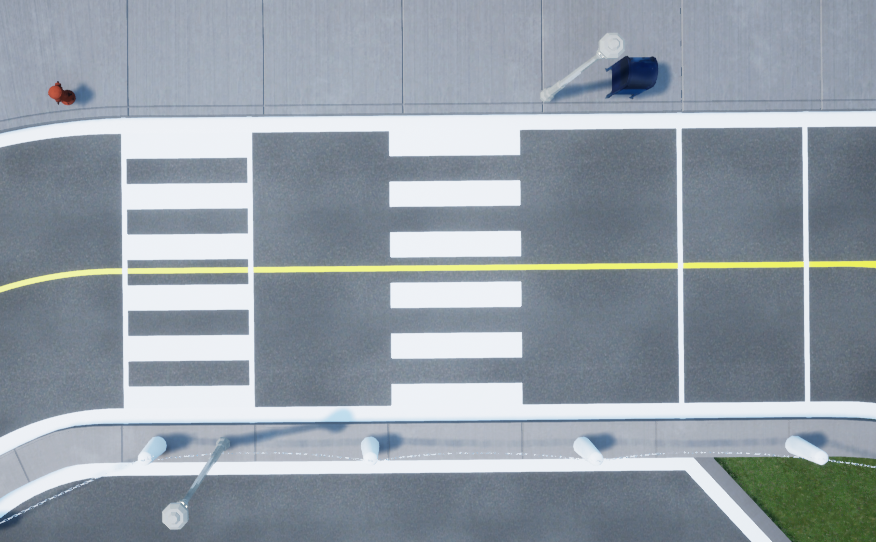
There are 3 different configurations (0-2) available for crosswalks generated in QLabs.
Connection Points
There are no connection points for this actor class.
Roundabout Sign
Library
Constants
- QLabsRoundaboutSign.ID_ROUNDABOUT_SIGN = 10060
Class ID
Member Variables
- QLabsRoundaboutSign.actorNumber = None
The current actor number of this class to be addressed. This will be set by spawn methods and cleared by destroy methods. It will not be modified by the destroy all actors. This can be manually altered at any time to use one object to address multiple actors.
Methods
- QLabsRoundaboutSign.spawn(location=[0, 0, 0], rotation=[0, 0, 0], scale=[1, 1, 1], configuration=0, waitForConfirmation=True)
Spawns a new actor with the next available actor number within this class.
- Parameters
location (float array[3]) – (Optional) An array of floats for x, y and z coordinates
rotation (float array[3]) – (Optional) An array of floats for the roll, pitch, and yaw in radians
scale (float array[3]) – (Optional) An array of floats for the scale in the x, y, and z directions. Scale values of 0.0 should not be used.
configuration (uint32) – (Optional) Spawn configuration. See class library for configuration options.
waitForConfirmation (boolean) – (Optional) Make this operation blocking until confirmation of the spawn has occurred. Note that if this is False, the returned actor number will be invalid.
- Returns
status - 0 if successful, 1 class not available, 3 unknown error, -1 communications error.
actorNumber - An actor number to use for future references.
- Return type
int32, int32
- QLabsRoundaboutSign.spawn_degrees(location=[0, 0, 0], rotation=[0, 0, 0], scale=[1, 1, 1], configuration=0, waitForConfirmation=True)
Spawns a new actor with the next available actor number within this class.
- Parameters
location (float array[3]) – (Optional) An array of floats for x, y and z coordinates
rotation (float array[3]) – (Optional) An array of floats for the roll, pitch, and yaw in degrees
scale (float array[3]) – (Optional) An array of floats for the scale in the x, y, and z directions. Scale values of 0.0 should not be used.
configuration (uint32) – (Optional) Spawn configuration. See class library for configuration options.
waitForConfirmation (boolean) – (Optional) Make this operation blocking until confirmation of the spawn has occurred. Note that if this is False, the returned actor number will be invalid.
- Returns
status - 0 if successful, 1 class not available, 3 unknown error, -1 communications error.
actorNumber - An actor number to use for future references.
- Return type
int32, int32
- QLabsRoundaboutSign.spawn_id(actorNumber, location=[0, 0, 0], rotation=[0, 0, 0], scale=[1, 1, 1], configuration=0, waitForConfirmation=True)
Spawns a new actor.
- Parameters
actorNumber (uint32) – User defined unique identifier for the class actor in QLabs
location (float array[3]) – (Optional) An array of floats for x, y and z coordinates
rotation (float array[3]) – (Optional) An array of floats for the roll, pitch, and yaw in radians
scale (float array[3]) – (Optional) An array of floats for the scale in the x, y, and z directions. Scale values of 0.0 should not be used.
configuration (uint32) – (Optional) Spawn configuration. See class library for configuration options.
waitForConfirmation (boolean) – (Optional) Make this operation blocking until confirmation of the spawn has occurred.
- Returns
status - 0 if successful, 1 class not available, 2 actor number not available or already in use, 3 unknown error, -1 communications error
- Return type
int32
- QLabsRoundaboutSign.spawn_id_degrees(actorNumber, location=[0, 0, 0], rotation=[0, 0, 0], scale=[1, 1, 1], configuration=0, waitForConfirmation=True)
Spawns a new actor.
- Parameters
actorNumber (uint32) – User defined unique identifier for the class actor in QLabs
location (float array[3]) – (Optional) An array of floats for x, y and z coordinates
rotation (float array[3]) – (Optional) An array of floats for the roll, pitch, and yaw in radians
scale (float array[3]) – (Optional) An array of floats for the scale in the x, y, and z directions. Scale values of 0.0 should not be used.
configuration (uint32) – (Optional) Spawn configuration. See class library for configuration options.
waitForConfirmation (boolean) – (Optional) Make this operation blocking until confirmation of the spawn has occurred.
- Returns
status - 0 if successful, 1 class not available, 2 actor number not available or already in use, 3 unknown error, -1 communications error
- Return type
int32
- QLabsRoundaboutSign.spawn_id_and_parent_with_relative_transform(actorNumber, location=[0, 0, 0], rotation=[0, 0, 0], scale=[1, 1, 1], configuration=0, parentClassID=0, parentActorNumber=0, parentComponent=0, waitForConfirmation=True)
Spawns a new actor relative to an existing actor and creates a kinematic relationship.
- Parameters
actorNumber (uint32) – User defined unique identifier for the class actor in QLabs
location (float array[3]) – (Optional) An array of floats for x, y and z coordinates
rotation (float array[3]) – (Optional) An array of floats for the roll, pitch, and yaw in radians
scale (float array[3]) – (Optional) An array of floats for the scale in the x, y, and z directions. Scale values of 0.0 should not be used.
configuration (uint32) – (Optional) Spawn configuration. See class library for configuration options.
parentClassID (uint32) – See the ID variables in the respective library classes for the class identifier
parentActorNumber (uint32) – User defined unique identifier for the class actor in QLabs
parentComponent (uint32) – 0 for the origin of the parent actor, see the parent class for additional reference frame options
waitForConfirmation (boolean) – (Optional) Make this operation blocking until confirmation of the spawn has occurred.
- Returns
status - 0 if successful, 1 class not available, 2 actor number not available or already in use, 3 cannot find the parent actor, 4 unknown error, -1 communications error
- Return type
int32
- QLabsRoundaboutSign.spawn_id_and_parent_with_relative_transform_degrees(actorNumber, location=[0, 0, 0], rotation=[0, 0, 0], scale=[1, 1, 1], configuration=0, parentClassID=0, parentActorNumber=0, parentComponent=0, waitForConfirmation=True)
Spawns a new actor relative to an existing actor and creates a kinematic relationship.
- Parameters
actorNumber (uint32) – User defined unique identifier for the class actor in QLabs
location (float array[3]) – (Optional) An array of floats for x, y and z coordinates
rotation (float array[3]) – (Optional) An array of floats for the roll, pitch, and yaw in degrees
scale (float array[3]) – (Optional) An array of floats for the scale in the x, y, and z directions. Scale values of 0.0 should not be used.
configuration (uint32) – (Optional) Spawn configuration. See class library for configuration options.
parentClassID (uint32) – See the ID variables in the respective library classes for the class identifier
parentActorNumber (uint32) – User defined unique identifier for the class actor in QLabs
parentComponent (uint32) – 0 for the origin of the parent actor, see the parent class for additional reference frame options
waitForConfirmation (boolean) – (Optional) Make this operation blocking until confirmation of the spawn has occurred.
- Returns
status - 0 if successful, 1 class not available, 2 actor number not available or already in use, 3 cannot find the parent actor, 4 unknown error, -1 communications error
- Return type
int32
- QLabsRoundaboutSign.destroy()
Find and destroy a specific actor. This is a blocking operation.
- Returns
numActorsDestroyed - The number of actors destroyed. -1 if failed.
- Return type
int32
- QLabsRoundaboutSign.destroy_all_actors_of_class()
Find and destroy all actors of this class. This is a blocking operation.
- Returns
numActorsDestroyed - The number of actors destroyed. -1 if failed.
- Return type
int32
- QLabsRoundaboutSign.ping()
Checks if the actor is still present in the environment. Note that if you did not spawn the actor with one of the spawn functions, you may need to manually set the actorNumber member variable.
- Returns
status - True if successful, False otherwise
- Return type
boolean
- QLabsRoundaboutSign.get_world_transform()
Get the location, rotation, and scale in world coordinates of the actor.
- Returns
status - True if successful, False otherwise
location
rotation
scale
- Return type
boolean, float array[3], float array[3], float array[3]
- QLabsRoundaboutSign.get_world_transform_degrees()
Get the location, rotation, and scale in world coordinates of the actor.
- Returns
status - True if successful, False otherwise
location
rotation
scale
- Return type
boolean, float array[3], float array[3], float array[3]
- QLabsRoundaboutSign.parent_with_relative_transform(location=[0, 0, 0], rotation=[0, 0, 0], scale=[1, 1, 1], parentClassID=0, parentActorNumber=0, parentComponent=0, waitForConfirmation=True)
Parents one existing actor to another to create a kinematic relationship.
- Parameters
location (float array[3]) – (Optional) An array of floats for x, y and z coordinates
rotation (float array[3]) – (Optional) An array of floats for the roll, pitch, and yaw in radians
scale (float array[3]) – (Optional) An array of floats for the scale in the x, y, and z directions. Scale values of 0.0 should not be used.
parentClassID (uint32) – See the ID variables in the respective library classes for the class identifier
parentActorNumber (uint32) – User defined unique identifier for the class actor in QLabs
parentComponent (uint32) – 0 for the origin of the parent actor, see the parent class for additional reference frame options
waitForConfirmation (boolean) – (Optional) Make this operation blocking until confirmation of the spawn has occurred.
- Returns
status - 0 if successful, 1 cannot find this actor, 2 cannot find the parent actor, 3 unknown error, -1 communications error
- Return type
int32
- QLabsRoundaboutSign.parent_with_relative_transform_degrees(location=[0, 0, 0], rotation=[0, 0, 0], scale=[1, 1, 1], parentClassID=0, parentActorNumber=0, parentComponent=0, waitForConfirmation=True)
Parents one existing actor to another to create a kinematic relationship.
- Parameters
location (float array[3]) – (Optional) An array of floats for x, y and z coordinates
rotation (float array[3]) – (Optional) An array of floats for the roll, pitch, and yaw in degrees
scale (float array[3]) – (Optional) An array of floats for the scale in the x, y, and z directions. Scale values of 0.0 should not be used.
parentClassID (uint32) – See the ID variables in the respective library classes for the class identifier
parentActorNumber (uint32) – User defined unique identifier for the class actor in QLabs
parentComponent (uint32) – 0 for the origin of the parent actor, see the parent class for additional reference frame options
waitForConfirmation (boolean) – (Optional) Make this operation blocking until confirmation of the spawn has occurred.
- Returns
status - 0 if successful, 1 cannot find this actor, 2 cannot find the parent actor, 3 unknown error, -1 communications error
- Return type
int32
- QLabsRoundaboutSign.parent_with_current_world_transform(parentClassID=0, parentActorNumber=0, parentComponent=0, waitForConfirmation=True)
Parents one existing actor to another to create a kinematic relationship while preserving the current world transform of the child actor.
- Parameters
parentClassID (uint32) – See the ID variables in the respective library classes for the class identifier
parentActorNumber (uint32) – User defined unique identifier for the class actor in QLabs
parentComponent (uint32) – 0 for the origin of the parent actor, see the parent class for additional reference frame options
waitForConfirmation (boolean) – (Optional) Make this operation blocking until confirmation of the spawn has occurred.
- Returns
status - 0 if successful, 1 cannot find this actor, 2 cannot find the parent actor, 3 unknown error, -1 communications error
- Return type
int32
- QLabsRoundaboutSign.parent_break(waitForConfirmation=True)
Breaks any relationship with a parent actor (if it exists) and preserves the current world transform
- Parameters
waitForConfirmation (boolean) – (Optional) Make this operation blocking until confirmation of the spawn has occurred.
- Returns
status - 0 if successful, 1 cannot find this actor, -1 communications error
- Return type
int32
Configurations
There is only one configuration (0) of the roundabout sign actor generated in QLabs.

Connection Points
There are no connection points for this actor class.
Stop Sign
Library
Constants
- QLabsStopSign.ID_STOP_SIGN = 10020
Class ID
Member Variables
- QLabsStopSign.actorNumber = None
The current actor number of this class to be addressed. This will be set by spawn methods and cleared by destroy methods. It will not be modified by the destroy all actors. This can be manually altered at any time to use one object to address multiple actors.
Methods
- QLabsStopSign.spawn(location=[0, 0, 0], rotation=[0, 0, 0], scale=[1, 1, 1], configuration=0, waitForConfirmation=True)
Spawns a new actor with the next available actor number within this class.
- Parameters
location (float array[3]) – (Optional) An array of floats for x, y and z coordinates
rotation (float array[3]) – (Optional) An array of floats for the roll, pitch, and yaw in radians
scale (float array[3]) – (Optional) An array of floats for the scale in the x, y, and z directions. Scale values of 0.0 should not be used.
configuration (uint32) – (Optional) Spawn configuration. See class library for configuration options.
waitForConfirmation (boolean) – (Optional) Make this operation blocking until confirmation of the spawn has occurred. Note that if this is False, the returned actor number will be invalid.
- Returns
status - 0 if successful, 1 class not available, 3 unknown error, -1 communications error.
actorNumber - An actor number to use for future references.
- Return type
int32, int32
- QLabsStopSign.spawn_degrees(location=[0, 0, 0], rotation=[0, 0, 0], scale=[1, 1, 1], configuration=0, waitForConfirmation=True)
Spawns a new actor with the next available actor number within this class.
- Parameters
location (float array[3]) – (Optional) An array of floats for x, y and z coordinates
rotation (float array[3]) – (Optional) An array of floats for the roll, pitch, and yaw in degrees
scale (float array[3]) – (Optional) An array of floats for the scale in the x, y, and z directions. Scale values of 0.0 should not be used.
configuration (uint32) – (Optional) Spawn configuration. See class library for configuration options.
waitForConfirmation (boolean) – (Optional) Make this operation blocking until confirmation of the spawn has occurred. Note that if this is False, the returned actor number will be invalid.
- Returns
status - 0 if successful, 1 class not available, 3 unknown error, -1 communications error.
actorNumber - An actor number to use for future references.
- Return type
int32, int32
- QLabsStopSign.spawn_id(actorNumber, location=[0, 0, 0], rotation=[0, 0, 0], scale=[1, 1, 1], configuration=0, waitForConfirmation=True)
Spawns a new actor.
- Parameters
actorNumber (uint32) – User defined unique identifier for the class actor in QLabs
location (float array[3]) – (Optional) An array of floats for x, y and z coordinates
rotation (float array[3]) – (Optional) An array of floats for the roll, pitch, and yaw in radians
scale (float array[3]) – (Optional) An array of floats for the scale in the x, y, and z directions. Scale values of 0.0 should not be used.
configuration (uint32) – (Optional) Spawn configuration. See class library for configuration options.
waitForConfirmation (boolean) – (Optional) Make this operation blocking until confirmation of the spawn has occurred.
- Returns
status - 0 if successful, 1 class not available, 2 actor number not available or already in use, 3 unknown error, -1 communications error
- Return type
int32
- QLabsStopSign.spawn_id_degrees(actorNumber, location=[0, 0, 0], rotation=[0, 0, 0], scale=[1, 1, 1], configuration=0, waitForConfirmation=True)
Spawns a new actor.
- Parameters
actorNumber (uint32) – User defined unique identifier for the class actor in QLabs
location (float array[3]) – (Optional) An array of floats for x, y and z coordinates
rotation (float array[3]) – (Optional) An array of floats for the roll, pitch, and yaw in radians
scale (float array[3]) – (Optional) An array of floats for the scale in the x, y, and z directions. Scale values of 0.0 should not be used.
configuration (uint32) – (Optional) Spawn configuration. See class library for configuration options.
waitForConfirmation (boolean) – (Optional) Make this operation blocking until confirmation of the spawn has occurred.
- Returns
status - 0 if successful, 1 class not available, 2 actor number not available or already in use, 3 unknown error, -1 communications error
- Return type
int32
- QLabsStopSign.spawn_id_and_parent_with_relative_transform(actorNumber, location=[0, 0, 0], rotation=[0, 0, 0], scale=[1, 1, 1], configuration=0, parentClassID=0, parentActorNumber=0, parentComponent=0, waitForConfirmation=True)
Spawns a new actor relative to an existing actor and creates a kinematic relationship.
- Parameters
actorNumber (uint32) – User defined unique identifier for the class actor in QLabs
location (float array[3]) – (Optional) An array of floats for x, y and z coordinates
rotation (float array[3]) – (Optional) An array of floats for the roll, pitch, and yaw in radians
scale (float array[3]) – (Optional) An array of floats for the scale in the x, y, and z directions. Scale values of 0.0 should not be used.
configuration (uint32) – (Optional) Spawn configuration. See class library for configuration options.
parentClassID (uint32) – See the ID variables in the respective library classes for the class identifier
parentActorNumber (uint32) – User defined unique identifier for the class actor in QLabs
parentComponent (uint32) – 0 for the origin of the parent actor, see the parent class for additional reference frame options
waitForConfirmation (boolean) – (Optional) Make this operation blocking until confirmation of the spawn has occurred.
- Returns
status - 0 if successful, 1 class not available, 2 actor number not available or already in use, 3 cannot find the parent actor, 4 unknown error, -1 communications error
- Return type
int32
- QLabsStopSign.spawn_id_and_parent_with_relative_transform_degrees(actorNumber, location=[0, 0, 0], rotation=[0, 0, 0], scale=[1, 1, 1], configuration=0, parentClassID=0, parentActorNumber=0, parentComponent=0, waitForConfirmation=True)
Spawns a new actor relative to an existing actor and creates a kinematic relationship.
- Parameters
actorNumber (uint32) – User defined unique identifier for the class actor in QLabs
location (float array[3]) – (Optional) An array of floats for x, y and z coordinates
rotation (float array[3]) – (Optional) An array of floats for the roll, pitch, and yaw in degrees
scale (float array[3]) – (Optional) An array of floats for the scale in the x, y, and z directions. Scale values of 0.0 should not be used.
configuration (uint32) – (Optional) Spawn configuration. See class library for configuration options.
parentClassID (uint32) – See the ID variables in the respective library classes for the class identifier
parentActorNumber (uint32) – User defined unique identifier for the class actor in QLabs
parentComponent (uint32) – 0 for the origin of the parent actor, see the parent class for additional reference frame options
waitForConfirmation (boolean) – (Optional) Make this operation blocking until confirmation of the spawn has occurred.
- Returns
status - 0 if successful, 1 class not available, 2 actor number not available or already in use, 3 cannot find the parent actor, 4 unknown error, -1 communications error
- Return type
int32
- QLabsStopSign.destroy()
Find and destroy a specific actor. This is a blocking operation.
- Returns
numActorsDestroyed - The number of actors destroyed. -1 if failed.
- Return type
int32
- QLabsStopSign.destroy_all_actors_of_class()
Find and destroy all actors of this class. This is a blocking operation.
- Returns
numActorsDestroyed - The number of actors destroyed. -1 if failed.
- Return type
int32
- QLabsStopSign.ping()
Checks if the actor is still present in the environment. Note that if you did not spawn the actor with one of the spawn functions, you may need to manually set the actorNumber member variable.
- Returns
status - True if successful, False otherwise
- Return type
boolean
- QLabsStopSign.get_world_transform()
Get the location, rotation, and scale in world coordinates of the actor.
- Returns
status - True if successful, False otherwise
location
rotation
scale
- Return type
boolean, float array[3], float array[3], float array[3]
- QLabsStopSign.get_world_transform_degrees()
Get the location, rotation, and scale in world coordinates of the actor.
- Returns
status - True if successful, False otherwise
location
rotation
scale
- Return type
boolean, float array[3], float array[3], float array[3]
- QLabsStopSign.parent_with_relative_transform(location=[0, 0, 0], rotation=[0, 0, 0], scale=[1, 1, 1], parentClassID=0, parentActorNumber=0, parentComponent=0, waitForConfirmation=True)
Parents one existing actor to another to create a kinematic relationship.
- Parameters
location (float array[3]) – (Optional) An array of floats for x, y and z coordinates
rotation (float array[3]) – (Optional) An array of floats for the roll, pitch, and yaw in radians
scale (float array[3]) – (Optional) An array of floats for the scale in the x, y, and z directions. Scale values of 0.0 should not be used.
parentClassID (uint32) – See the ID variables in the respective library classes for the class identifier
parentActorNumber (uint32) – User defined unique identifier for the class actor in QLabs
parentComponent (uint32) – 0 for the origin of the parent actor, see the parent class for additional reference frame options
waitForConfirmation (boolean) – (Optional) Make this operation blocking until confirmation of the spawn has occurred.
- Returns
status - 0 if successful, 1 cannot find this actor, 2 cannot find the parent actor, 3 unknown error, -1 communications error
- Return type
int32
- QLabsStopSign.parent_with_relative_transform_degrees(location=[0, 0, 0], rotation=[0, 0, 0], scale=[1, 1, 1], parentClassID=0, parentActorNumber=0, parentComponent=0, waitForConfirmation=True)
Parents one existing actor to another to create a kinematic relationship.
- Parameters
location (float array[3]) – (Optional) An array of floats for x, y and z coordinates
rotation (float array[3]) – (Optional) An array of floats for the roll, pitch, and yaw in degrees
scale (float array[3]) – (Optional) An array of floats for the scale in the x, y, and z directions. Scale values of 0.0 should not be used.
parentClassID (uint32) – See the ID variables in the respective library classes for the class identifier
parentActorNumber (uint32) – User defined unique identifier for the class actor in QLabs
parentComponent (uint32) – 0 for the origin of the parent actor, see the parent class for additional reference frame options
waitForConfirmation (boolean) – (Optional) Make this operation blocking until confirmation of the spawn has occurred.
- Returns
status - 0 if successful, 1 cannot find this actor, 2 cannot find the parent actor, 3 unknown error, -1 communications error
- Return type
int32
- QLabsStopSign.parent_with_current_world_transform(parentClassID=0, parentActorNumber=0, parentComponent=0, waitForConfirmation=True)
Parents one existing actor to another to create a kinematic relationship while preserving the current world transform of the child actor.
- Parameters
parentClassID (uint32) – See the ID variables in the respective library classes for the class identifier
parentActorNumber (uint32) – User defined unique identifier for the class actor in QLabs
parentComponent (uint32) – 0 for the origin of the parent actor, see the parent class for additional reference frame options
waitForConfirmation (boolean) – (Optional) Make this operation blocking until confirmation of the spawn has occurred.
- Returns
status - 0 if successful, 1 cannot find this actor, 2 cannot find the parent actor, 3 unknown error, -1 communications error
- Return type
int32
- QLabsStopSign.parent_break(waitForConfirmation=True)
Breaks any relationship with a parent actor (if it exists) and preserves the current world transform
- Parameters
waitForConfirmation (boolean) – (Optional) Make this operation blocking until confirmation of the spawn has occurred.
- Returns
status - 0 if successful, 1 cannot find this actor, -1 communications error
- Return type
int32
Configurations
There is only one configuration (0) of the stop sign actor generated in QLabs.

Connection Points
There are no connection points for this actor class.
Yield Sign
Library
Constants
- QLabsYieldSign.ID_YIELD_SIGN = 10070
Class ID
Member Variables
- QLabsYieldSign.actorNumber = None
The current actor number of this class to be addressed. This will be set by spawn methods and cleared by destroy methods. It will not be modified by the destroy all actors. This can be manually altered at any time to use one object to address multiple actors.
Methods
- QLabsYieldSign.spawn(location=[0, 0, 0], rotation=[0, 0, 0], scale=[1, 1, 1], configuration=0, waitForConfirmation=True)
Spawns a new actor with the next available actor number within this class.
- Parameters
location (float array[3]) – (Optional) An array of floats for x, y and z coordinates
rotation (float array[3]) – (Optional) An array of floats for the roll, pitch, and yaw in radians
scale (float array[3]) – (Optional) An array of floats for the scale in the x, y, and z directions. Scale values of 0.0 should not be used.
configuration (uint32) – (Optional) Spawn configuration. See class library for configuration options.
waitForConfirmation (boolean) – (Optional) Make this operation blocking until confirmation of the spawn has occurred. Note that if this is False, the returned actor number will be invalid.
- Returns
status - 0 if successful, 1 class not available, 3 unknown error, -1 communications error.
actorNumber - An actor number to use for future references.
- Return type
int32, int32
- QLabsYieldSign.spawn_degrees(location=[0, 0, 0], rotation=[0, 0, 0], scale=[1, 1, 1], configuration=0, waitForConfirmation=True)
Spawns a new actor with the next available actor number within this class.
- Parameters
location (float array[3]) – (Optional) An array of floats for x, y and z coordinates
rotation (float array[3]) – (Optional) An array of floats for the roll, pitch, and yaw in degrees
scale (float array[3]) – (Optional) An array of floats for the scale in the x, y, and z directions. Scale values of 0.0 should not be used.
configuration (uint32) – (Optional) Spawn configuration. See class library for configuration options.
waitForConfirmation (boolean) – (Optional) Make this operation blocking until confirmation of the spawn has occurred. Note that if this is False, the returned actor number will be invalid.
- Returns
status - 0 if successful, 1 class not available, 3 unknown error, -1 communications error.
actorNumber - An actor number to use for future references.
- Return type
int32, int32
- QLabsYieldSign.spawn_id(actorNumber, location=[0, 0, 0], rotation=[0, 0, 0], scale=[1, 1, 1], configuration=0, waitForConfirmation=True)
Spawns a new actor.
- Parameters
actorNumber (uint32) – User defined unique identifier for the class actor in QLabs
location (float array[3]) – (Optional) An array of floats for x, y and z coordinates
rotation (float array[3]) – (Optional) An array of floats for the roll, pitch, and yaw in radians
scale (float array[3]) – (Optional) An array of floats for the scale in the x, y, and z directions. Scale values of 0.0 should not be used.
configuration (uint32) – (Optional) Spawn configuration. See class library for configuration options.
waitForConfirmation (boolean) – (Optional) Make this operation blocking until confirmation of the spawn has occurred.
- Returns
status - 0 if successful, 1 class not available, 2 actor number not available or already in use, 3 unknown error, -1 communications error
- Return type
int32
- QLabsYieldSign.spawn_id_degrees(actorNumber, location=[0, 0, 0], rotation=[0, 0, 0], scale=[1, 1, 1], configuration=0, waitForConfirmation=True)
Spawns a new actor.
- Parameters
actorNumber (uint32) – User defined unique identifier for the class actor in QLabs
location (float array[3]) – (Optional) An array of floats for x, y and z coordinates
rotation (float array[3]) – (Optional) An array of floats for the roll, pitch, and yaw in radians
scale (float array[3]) – (Optional) An array of floats for the scale in the x, y, and z directions. Scale values of 0.0 should not be used.
configuration (uint32) – (Optional) Spawn configuration. See class library for configuration options.
waitForConfirmation (boolean) – (Optional) Make this operation blocking until confirmation of the spawn has occurred.
- Returns
status - 0 if successful, 1 class not available, 2 actor number not available or already in use, 3 unknown error, -1 communications error
- Return type
int32
- QLabsYieldSign.spawn_id_and_parent_with_relative_transform(actorNumber, location=[0, 0, 0], rotation=[0, 0, 0], scale=[1, 1, 1], configuration=0, parentClassID=0, parentActorNumber=0, parentComponent=0, waitForConfirmation=True)
Spawns a new actor relative to an existing actor and creates a kinematic relationship.
- Parameters
actorNumber (uint32) – User defined unique identifier for the class actor in QLabs
location (float array[3]) – (Optional) An array of floats for x, y and z coordinates
rotation (float array[3]) – (Optional) An array of floats for the roll, pitch, and yaw in radians
scale (float array[3]) – (Optional) An array of floats for the scale in the x, y, and z directions. Scale values of 0.0 should not be used.
configuration (uint32) – (Optional) Spawn configuration. See class library for configuration options.
parentClassID (uint32) – See the ID variables in the respective library classes for the class identifier
parentActorNumber (uint32) – User defined unique identifier for the class actor in QLabs
parentComponent (uint32) – 0 for the origin of the parent actor, see the parent class for additional reference frame options
waitForConfirmation (boolean) – (Optional) Make this operation blocking until confirmation of the spawn has occurred.
- Returns
status - 0 if successful, 1 class not available, 2 actor number not available or already in use, 3 cannot find the parent actor, 4 unknown error, -1 communications error
- Return type
int32
- QLabsYieldSign.spawn_id_and_parent_with_relative_transform_degrees(actorNumber, location=[0, 0, 0], rotation=[0, 0, 0], scale=[1, 1, 1], configuration=0, parentClassID=0, parentActorNumber=0, parentComponent=0, waitForConfirmation=True)
Spawns a new actor relative to an existing actor and creates a kinematic relationship.
- Parameters
actorNumber (uint32) – User defined unique identifier for the class actor in QLabs
location (float array[3]) – (Optional) An array of floats for x, y and z coordinates
rotation (float array[3]) – (Optional) An array of floats for the roll, pitch, and yaw in degrees
scale (float array[3]) – (Optional) An array of floats for the scale in the x, y, and z directions. Scale values of 0.0 should not be used.
configuration (uint32) – (Optional) Spawn configuration. See class library for configuration options.
parentClassID (uint32) – See the ID variables in the respective library classes for the class identifier
parentActorNumber (uint32) – User defined unique identifier for the class actor in QLabs
parentComponent (uint32) – 0 for the origin of the parent actor, see the parent class for additional reference frame options
waitForConfirmation (boolean) – (Optional) Make this operation blocking until confirmation of the spawn has occurred.
- Returns
status - 0 if successful, 1 class not available, 2 actor number not available or already in use, 3 cannot find the parent actor, 4 unknown error, -1 communications error
- Return type
int32
- QLabsYieldSign.destroy()
Find and destroy a specific actor. This is a blocking operation.
- Returns
numActorsDestroyed - The number of actors destroyed. -1 if failed.
- Return type
int32
- QLabsYieldSign.destroy_all_actors_of_class()
Find and destroy all actors of this class. This is a blocking operation.
- Returns
numActorsDestroyed - The number of actors destroyed. -1 if failed.
- Return type
int32
- QLabsYieldSign.ping()
Checks if the actor is still present in the environment. Note that if you did not spawn the actor with one of the spawn functions, you may need to manually set the actorNumber member variable.
- Returns
status - True if successful, False otherwise
- Return type
boolean
- QLabsYieldSign.get_world_transform()
Get the location, rotation, and scale in world coordinates of the actor.
- Returns
status - True if successful, False otherwise
location
rotation
scale
- Return type
boolean, float array[3], float array[3], float array[3]
- QLabsYieldSign.get_world_transform_degrees()
Get the location, rotation, and scale in world coordinates of the actor.
- Returns
status - True if successful, False otherwise
location
rotation
scale
- Return type
boolean, float array[3], float array[3], float array[3]
- QLabsYieldSign.parent_with_relative_transform(location=[0, 0, 0], rotation=[0, 0, 0], scale=[1, 1, 1], parentClassID=0, parentActorNumber=0, parentComponent=0, waitForConfirmation=True)
Parents one existing actor to another to create a kinematic relationship.
- Parameters
location (float array[3]) – (Optional) An array of floats for x, y and z coordinates
rotation (float array[3]) – (Optional) An array of floats for the roll, pitch, and yaw in radians
scale (float array[3]) – (Optional) An array of floats for the scale in the x, y, and z directions. Scale values of 0.0 should not be used.
parentClassID (uint32) – See the ID variables in the respective library classes for the class identifier
parentActorNumber (uint32) – User defined unique identifier for the class actor in QLabs
parentComponent (uint32) – 0 for the origin of the parent actor, see the parent class for additional reference frame options
waitForConfirmation (boolean) – (Optional) Make this operation blocking until confirmation of the spawn has occurred.
- Returns
status - 0 if successful, 1 cannot find this actor, 2 cannot find the parent actor, 3 unknown error, -1 communications error
- Return type
int32
- QLabsYieldSign.parent_with_relative_transform_degrees(location=[0, 0, 0], rotation=[0, 0, 0], scale=[1, 1, 1], parentClassID=0, parentActorNumber=0, parentComponent=0, waitForConfirmation=True)
Parents one existing actor to another to create a kinematic relationship.
- Parameters
location (float array[3]) – (Optional) An array of floats for x, y and z coordinates
rotation (float array[3]) – (Optional) An array of floats for the roll, pitch, and yaw in degrees
scale (float array[3]) – (Optional) An array of floats for the scale in the x, y, and z directions. Scale values of 0.0 should not be used.
parentClassID (uint32) – See the ID variables in the respective library classes for the class identifier
parentActorNumber (uint32) – User defined unique identifier for the class actor in QLabs
parentComponent (uint32) – 0 for the origin of the parent actor, see the parent class for additional reference frame options
waitForConfirmation (boolean) – (Optional) Make this operation blocking until confirmation of the spawn has occurred.
- Returns
status - 0 if successful, 1 cannot find this actor, 2 cannot find the parent actor, 3 unknown error, -1 communications error
- Return type
int32
- QLabsYieldSign.parent_with_current_world_transform(parentClassID=0, parentActorNumber=0, parentComponent=0, waitForConfirmation=True)
Parents one existing actor to another to create a kinematic relationship while preserving the current world transform of the child actor.
- Parameters
parentClassID (uint32) – See the ID variables in the respective library classes for the class identifier
parentActorNumber (uint32) – User defined unique identifier for the class actor in QLabs
parentComponent (uint32) – 0 for the origin of the parent actor, see the parent class for additional reference frame options
waitForConfirmation (boolean) – (Optional) Make this operation blocking until confirmation of the spawn has occurred.
- Returns
status - 0 if successful, 1 cannot find this actor, 2 cannot find the parent actor, 3 unknown error, -1 communications error
- Return type
int32
- QLabsYieldSign.parent_break(waitForConfirmation=True)
Breaks any relationship with a parent actor (if it exists) and preserves the current world transform
- Parameters
waitForConfirmation (boolean) – (Optional) Make this operation blocking until confirmation of the spawn has occurred.
- Returns
status - 0 if successful, 1 cannot find this actor, -1 communications error
- Return type
int32
Configurations
There is only one configuration (0) of the yield sign actor generated in QLabs.

Connection Points
There are no connection points for this actor class.
Traffic Cone
Library
Constants
- QLabsTrafficCone.ID_TRAFFIC_CONE = 10000
Class ID
Member Variables
- QLabsTrafficCone.actorNumber = None
The current actor number of this class to be addressed. This will be set by spawn methods and cleared by destroy methods. It will not be modified by the destroy all actors. This can be manually altered at any time to use one object to address multiple actors.
Methods
- QLabsTrafficCone.spawn(location=[0, 0, 0], rotation=[0, 0, 0], scale=[1, 1, 1], configuration=0, waitForConfirmation=True)
Spawns a new actor with the next available actor number within this class.
- Parameters
location (float array[3]) – (Optional) An array of floats for x, y and z coordinates
rotation (float array[3]) – (Optional) An array of floats for the roll, pitch, and yaw in radians
scale (float array[3]) – (Optional) An array of floats for the scale in the x, y, and z directions. Scale values of 0.0 should not be used.
configuration (uint32) – (Optional) Spawn configuration. See class library for configuration options.
waitForConfirmation (boolean) – (Optional) Make this operation blocking until confirmation of the spawn has occurred. Note that if this is False, the returned actor number will be invalid.
- Returns
status - 0 if successful, 1 class not available, 3 unknown error, -1 communications error.
actorNumber - An actor number to use for future references.
- Return type
int32, int32
- QLabsTrafficCone.spawn_degrees(location=[0, 0, 0], rotation=[0, 0, 0], scale=[1, 1, 1], configuration=0, waitForConfirmation=True)
Spawns a new actor with the next available actor number within this class.
- Parameters
location (float array[3]) – (Optional) An array of floats for x, y and z coordinates
rotation (float array[3]) – (Optional) An array of floats for the roll, pitch, and yaw in degrees
scale (float array[3]) – (Optional) An array of floats for the scale in the x, y, and z directions. Scale values of 0.0 should not be used.
configuration (uint32) – (Optional) Spawn configuration. See class library for configuration options.
waitForConfirmation (boolean) – (Optional) Make this operation blocking until confirmation of the spawn has occurred. Note that if this is False, the returned actor number will be invalid.
- Returns
status - 0 if successful, 1 class not available, 3 unknown error, -1 communications error.
actorNumber - An actor number to use for future references.
- Return type
int32, int32
- QLabsTrafficCone.spawn_id(actorNumber, location=[0, 0, 0], rotation=[0, 0, 0], scale=[1, 1, 1], configuration=0, waitForConfirmation=True)
Spawns a new actor.
- Parameters
actorNumber (uint32) – User defined unique identifier for the class actor in QLabs
location (float array[3]) – (Optional) An array of floats for x, y and z coordinates
rotation (float array[3]) – (Optional) An array of floats for the roll, pitch, and yaw in radians
scale (float array[3]) – (Optional) An array of floats for the scale in the x, y, and z directions. Scale values of 0.0 should not be used.
configuration (uint32) – (Optional) Spawn configuration. See class library for configuration options.
waitForConfirmation (boolean) – (Optional) Make this operation blocking until confirmation of the spawn has occurred.
- Returns
status - 0 if successful, 1 class not available, 2 actor number not available or already in use, 3 unknown error, -1 communications error
- Return type
int32
- QLabsTrafficCone.spawn_id_degrees(actorNumber, location=[0, 0, 0], rotation=[0, 0, 0], scale=[1, 1, 1], configuration=0, waitForConfirmation=True)
Spawns a new actor.
- Parameters
actorNumber (uint32) – User defined unique identifier for the class actor in QLabs
location (float array[3]) – (Optional) An array of floats for x, y and z coordinates
rotation (float array[3]) – (Optional) An array of floats for the roll, pitch, and yaw in radians
scale (float array[3]) – (Optional) An array of floats for the scale in the x, y, and z directions. Scale values of 0.0 should not be used.
configuration (uint32) – (Optional) Spawn configuration. See class library for configuration options.
waitForConfirmation (boolean) – (Optional) Make this operation blocking until confirmation of the spawn has occurred.
- Returns
status - 0 if successful, 1 class not available, 2 actor number not available or already in use, 3 unknown error, -1 communications error
- Return type
int32
- QLabsTrafficCone.spawn_id_and_parent_with_relative_transform(actorNumber, location=[0, 0, 0], rotation=[0, 0, 0], scale=[1, 1, 1], configuration=0, parentClassID=0, parentActorNumber=0, parentComponent=0, waitForConfirmation=True)
Spawns a new actor relative to an existing actor and creates a kinematic relationship.
- Parameters
actorNumber (uint32) – User defined unique identifier for the class actor in QLabs
location (float array[3]) – (Optional) An array of floats for x, y and z coordinates
rotation (float array[3]) – (Optional) An array of floats for the roll, pitch, and yaw in radians
scale (float array[3]) – (Optional) An array of floats for the scale in the x, y, and z directions. Scale values of 0.0 should not be used.
configuration (uint32) – (Optional) Spawn configuration. See class library for configuration options.
parentClassID (uint32) – See the ID variables in the respective library classes for the class identifier
parentActorNumber (uint32) – User defined unique identifier for the class actor in QLabs
parentComponent (uint32) – 0 for the origin of the parent actor, see the parent class for additional reference frame options
waitForConfirmation (boolean) – (Optional) Make this operation blocking until confirmation of the spawn has occurred.
- Returns
status - 0 if successful, 1 class not available, 2 actor number not available or already in use, 3 cannot find the parent actor, 4 unknown error, -1 communications error
- Return type
int32
- QLabsTrafficCone.spawn_id_and_parent_with_relative_transform_degrees(actorNumber, location=[0, 0, 0], rotation=[0, 0, 0], scale=[1, 1, 1], configuration=0, parentClassID=0, parentActorNumber=0, parentComponent=0, waitForConfirmation=True)
Spawns a new actor relative to an existing actor and creates a kinematic relationship.
- Parameters
actorNumber (uint32) – User defined unique identifier for the class actor in QLabs
location (float array[3]) – (Optional) An array of floats for x, y and z coordinates
rotation (float array[3]) – (Optional) An array of floats for the roll, pitch, and yaw in degrees
scale (float array[3]) – (Optional) An array of floats for the scale in the x, y, and z directions. Scale values of 0.0 should not be used.
configuration (uint32) – (Optional) Spawn configuration. See class library for configuration options.
parentClassID (uint32) – See the ID variables in the respective library classes for the class identifier
parentActorNumber (uint32) – User defined unique identifier for the class actor in QLabs
parentComponent (uint32) – 0 for the origin of the parent actor, see the parent class for additional reference frame options
waitForConfirmation (boolean) – (Optional) Make this operation blocking until confirmation of the spawn has occurred.
- Returns
status - 0 if successful, 1 class not available, 2 actor number not available or already in use, 3 cannot find the parent actor, 4 unknown error, -1 communications error
- Return type
int32
- QLabsTrafficCone.destroy()
Find and destroy a specific actor. This is a blocking operation.
- Returns
numActorsDestroyed - The number of actors destroyed. -1 if failed.
- Return type
int32
- QLabsTrafficCone.destroy_all_actors_of_class()
Find and destroy all actors of this class. This is a blocking operation.
- Returns
numActorsDestroyed - The number of actors destroyed. -1 if failed.
- Return type
int32
- QLabsTrafficCone.ping()
Checks if the actor is still present in the environment. Note that if you did not spawn the actor with one of the spawn functions, you may need to manually set the actorNumber member variable.
- Returns
status - True if successful, False otherwise
- Return type
boolean
- QLabsTrafficCone.get_world_transform()
Get the location, rotation, and scale in world coordinates of the actor.
- Returns
status - True if successful, False otherwise
location
rotation
scale
- Return type
boolean, float array[3], float array[3], float array[3]
- QLabsTrafficCone.get_world_transform_degrees()
Get the location, rotation, and scale in world coordinates of the actor.
- Returns
status - True if successful, False otherwise
location
rotation
scale
- Return type
boolean, float array[3], float array[3], float array[3]
- QLabsTrafficCone.parent_with_relative_transform(location=[0, 0, 0], rotation=[0, 0, 0], scale=[1, 1, 1], parentClassID=0, parentActorNumber=0, parentComponent=0, waitForConfirmation=True)
Parents one existing actor to another to create a kinematic relationship.
- Parameters
location (float array[3]) – (Optional) An array of floats for x, y and z coordinates
rotation (float array[3]) – (Optional) An array of floats for the roll, pitch, and yaw in radians
scale (float array[3]) – (Optional) An array of floats for the scale in the x, y, and z directions. Scale values of 0.0 should not be used.
parentClassID (uint32) – See the ID variables in the respective library classes for the class identifier
parentActorNumber (uint32) – User defined unique identifier for the class actor in QLabs
parentComponent (uint32) – 0 for the origin of the parent actor, see the parent class for additional reference frame options
waitForConfirmation (boolean) – (Optional) Make this operation blocking until confirmation of the spawn has occurred.
- Returns
status - 0 if successful, 1 cannot find this actor, 2 cannot find the parent actor, 3 unknown error, -1 communications error
- Return type
int32
- QLabsTrafficCone.parent_with_relative_transform_degrees(location=[0, 0, 0], rotation=[0, 0, 0], scale=[1, 1, 1], parentClassID=0, parentActorNumber=0, parentComponent=0, waitForConfirmation=True)
Parents one existing actor to another to create a kinematic relationship.
- Parameters
location (float array[3]) – (Optional) An array of floats for x, y and z coordinates
rotation (float array[3]) – (Optional) An array of floats for the roll, pitch, and yaw in degrees
scale (float array[3]) – (Optional) An array of floats for the scale in the x, y, and z directions. Scale values of 0.0 should not be used.
parentClassID (uint32) – See the ID variables in the respective library classes for the class identifier
parentActorNumber (uint32) – User defined unique identifier for the class actor in QLabs
parentComponent (uint32) – 0 for the origin of the parent actor, see the parent class for additional reference frame options
waitForConfirmation (boolean) – (Optional) Make this operation blocking until confirmation of the spawn has occurred.
- Returns
status - 0 if successful, 1 cannot find this actor, 2 cannot find the parent actor, 3 unknown error, -1 communications error
- Return type
int32
- QLabsTrafficCone.parent_with_current_world_transform(parentClassID=0, parentActorNumber=0, parentComponent=0, waitForConfirmation=True)
Parents one existing actor to another to create a kinematic relationship while preserving the current world transform of the child actor.
- Parameters
parentClassID (uint32) – See the ID variables in the respective library classes for the class identifier
parentActorNumber (uint32) – User defined unique identifier for the class actor in QLabs
parentComponent (uint32) – 0 for the origin of the parent actor, see the parent class for additional reference frame options
waitForConfirmation (boolean) – (Optional) Make this operation blocking until confirmation of the spawn has occurred.
- Returns
status - 0 if successful, 1 cannot find this actor, 2 cannot find the parent actor, 3 unknown error, -1 communications error
- Return type
int32
- QLabsTrafficCone.parent_break(waitForConfirmation=True)
Breaks any relationship with a parent actor (if it exists) and preserves the current world transform
- Parameters
waitForConfirmation (boolean) – (Optional) Make this operation blocking until confirmation of the spawn has occurred.
- Returns
status - 0 if successful, 1 cannot find this actor, -1 communications error
- Return type
int32
Configurations
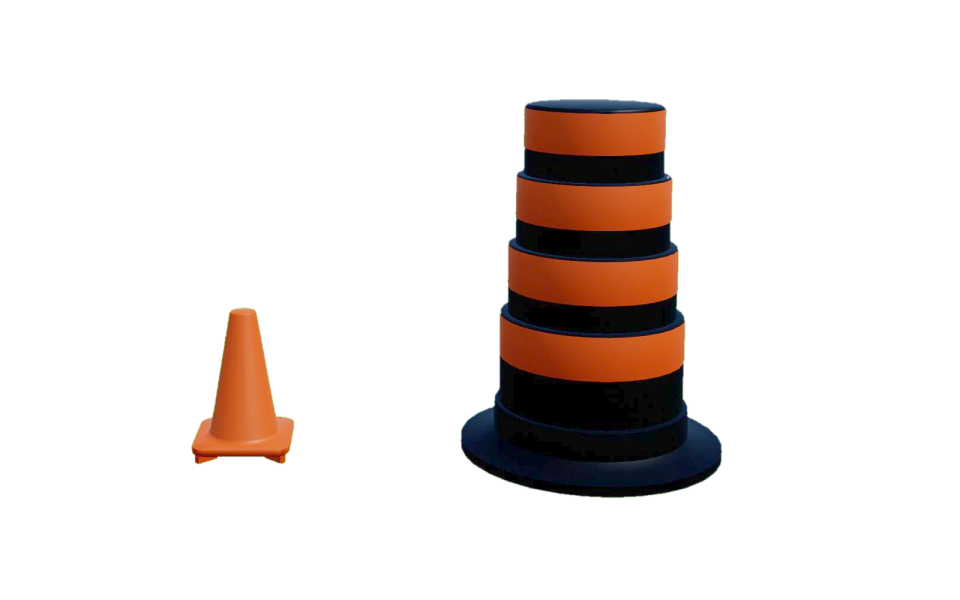
There are two configurations (0-1) for the traffic cone actor class generated in QLabs.
Connection Points
There are no connection points for this actor class.
Traffic Light
Library
Constants
- QLabsTrafficLight.ID_TRAFFIC_LIGHT = 10051
Class ID
- QLabsTrafficLight.STATE_RED = 0
State constant for red light
- QLabsTrafficLight.STATE_GREEN = 1
State constant for green light
- QLabsTrafficLight.STATE_YELLOW = 2
State constant for yellow light
Member Variables
- QLabsTrafficLight.actorNumber = None
The current actor number of this class to be addressed. This will be set by spawn methods and cleared by destroy methods. It will not be modified by the destroy all actors. This can be manually altered at any time to use one object to address multiple actors.
Methods
- QLabsTrafficLight.__init__(qlabs, verbose=False)[source]
Constructor Method
- Parameters
qlabs (object) – A QuanserInteractiveLabs object
verbose (boolean) – (Optional) Print error information to the console.
- QLabsTrafficLight.spawn(location=[0, 0, 0], rotation=[0, 0, 0], scale=[1, 1, 1], configuration=0, waitForConfirmation=True)
Spawns a new actor with the next available actor number within this class.
- Parameters
location (float array[3]) – (Optional) An array of floats for x, y and z coordinates
rotation (float array[3]) – (Optional) An array of floats for the roll, pitch, and yaw in radians
scale (float array[3]) – (Optional) An array of floats for the scale in the x, y, and z directions. Scale values of 0.0 should not be used.
configuration (uint32) – (Optional) Spawn configuration. See class library for configuration options.
waitForConfirmation (boolean) – (Optional) Make this operation blocking until confirmation of the spawn has occurred. Note that if this is False, the returned actor number will be invalid.
- Returns
status - 0 if successful, 1 class not available, 3 unknown error, -1 communications error.
actorNumber - An actor number to use for future references.
- Return type
int32, int32
- QLabsTrafficLight.spawn_degrees(location=[0, 0, 0], rotation=[0, 0, 0], scale=[1, 1, 1], configuration=0, waitForConfirmation=True)
Spawns a new actor with the next available actor number within this class.
- Parameters
location (float array[3]) – (Optional) An array of floats for x, y and z coordinates
rotation (float array[3]) – (Optional) An array of floats for the roll, pitch, and yaw in degrees
scale (float array[3]) – (Optional) An array of floats for the scale in the x, y, and z directions. Scale values of 0.0 should not be used.
configuration (uint32) – (Optional) Spawn configuration. See class library for configuration options.
waitForConfirmation (boolean) – (Optional) Make this operation blocking until confirmation of the spawn has occurred. Note that if this is False, the returned actor number will be invalid.
- Returns
status - 0 if successful, 1 class not available, 3 unknown error, -1 communications error.
actorNumber - An actor number to use for future references.
- Return type
int32, int32
- QLabsTrafficLight.spawn_id(actorNumber, location=[0, 0, 0], rotation=[0, 0, 0], scale=[1, 1, 1], configuration=0, waitForConfirmation=True)
Spawns a new actor.
- Parameters
actorNumber (uint32) – User defined unique identifier for the class actor in QLabs
location (float array[3]) – (Optional) An array of floats for x, y and z coordinates
rotation (float array[3]) – (Optional) An array of floats for the roll, pitch, and yaw in radians
scale (float array[3]) – (Optional) An array of floats for the scale in the x, y, and z directions. Scale values of 0.0 should not be used.
configuration (uint32) – (Optional) Spawn configuration. See class library for configuration options.
waitForConfirmation (boolean) – (Optional) Make this operation blocking until confirmation of the spawn has occurred.
- Returns
status - 0 if successful, 1 class not available, 2 actor number not available or already in use, 3 unknown error, -1 communications error
- Return type
int32
- QLabsTrafficLight.spawn_id_degrees(actorNumber, location=[0, 0, 0], rotation=[0, 0, 0], scale=[1, 1, 1], configuration=0, waitForConfirmation=True)
Spawns a new actor.
- Parameters
actorNumber (uint32) – User defined unique identifier for the class actor in QLabs
location (float array[3]) – (Optional) An array of floats for x, y and z coordinates
rotation (float array[3]) – (Optional) An array of floats for the roll, pitch, and yaw in radians
scale (float array[3]) – (Optional) An array of floats for the scale in the x, y, and z directions. Scale values of 0.0 should not be used.
configuration (uint32) – (Optional) Spawn configuration. See class library for configuration options.
waitForConfirmation (boolean) – (Optional) Make this operation blocking until confirmation of the spawn has occurred.
- Returns
status - 0 if successful, 1 class not available, 2 actor number not available or already in use, 3 unknown error, -1 communications error
- Return type
int32
- QLabsTrafficLight.spawn_id_and_parent_with_relative_transform(actorNumber, location=[0, 0, 0], rotation=[0, 0, 0], scale=[1, 1, 1], configuration=0, parentClassID=0, parentActorNumber=0, parentComponent=0, waitForConfirmation=True)
Spawns a new actor relative to an existing actor and creates a kinematic relationship.
- Parameters
actorNumber (uint32) – User defined unique identifier for the class actor in QLabs
location (float array[3]) – (Optional) An array of floats for x, y and z coordinates
rotation (float array[3]) – (Optional) An array of floats for the roll, pitch, and yaw in radians
scale (float array[3]) – (Optional) An array of floats for the scale in the x, y, and z directions. Scale values of 0.0 should not be used.
configuration (uint32) – (Optional) Spawn configuration. See class library for configuration options.
parentClassID (uint32) – See the ID variables in the respective library classes for the class identifier
parentActorNumber (uint32) – User defined unique identifier for the class actor in QLabs
parentComponent (uint32) – 0 for the origin of the parent actor, see the parent class for additional reference frame options
waitForConfirmation (boolean) – (Optional) Make this operation blocking until confirmation of the spawn has occurred.
- Returns
status - 0 if successful, 1 class not available, 2 actor number not available or already in use, 3 cannot find the parent actor, 4 unknown error, -1 communications error
- Return type
int32
- QLabsTrafficLight.spawn_id_and_parent_with_relative_transform_degrees(actorNumber, location=[0, 0, 0], rotation=[0, 0, 0], scale=[1, 1, 1], configuration=0, parentClassID=0, parentActorNumber=0, parentComponent=0, waitForConfirmation=True)
Spawns a new actor relative to an existing actor and creates a kinematic relationship.
- Parameters
actorNumber (uint32) – User defined unique identifier for the class actor in QLabs
location (float array[3]) – (Optional) An array of floats for x, y and z coordinates
rotation (float array[3]) – (Optional) An array of floats for the roll, pitch, and yaw in degrees
scale (float array[3]) – (Optional) An array of floats for the scale in the x, y, and z directions. Scale values of 0.0 should not be used.
configuration (uint32) – (Optional) Spawn configuration. See class library for configuration options.
parentClassID (uint32) – See the ID variables in the respective library classes for the class identifier
parentActorNumber (uint32) – User defined unique identifier for the class actor in QLabs
parentComponent (uint32) – 0 for the origin of the parent actor, see the parent class for additional reference frame options
waitForConfirmation (boolean) – (Optional) Make this operation blocking until confirmation of the spawn has occurred.
- Returns
status - 0 if successful, 1 class not available, 2 actor number not available or already in use, 3 cannot find the parent actor, 4 unknown error, -1 communications error
- Return type
int32
- QLabsTrafficLight.set_state(state, waitForConfirmation=True)[source]
Set the light state (red/yellow/green) of a traffic light actor
- Parameters
state (uint32) – An integer constant corresponding to a light state (see class constants)
waitForConfirmation (boolean) – (Optional) Wait for confirmation of the state change before proceeding. This makes the method a blocking operation.
- Returns
True if successful, False otherwise
- Return type
boolean
- QLabsTrafficLight.destroy()
Find and destroy a specific actor. This is a blocking operation.
- Returns
numActorsDestroyed - The number of actors destroyed. -1 if failed.
- Return type
int32
- QLabsTrafficLight.destroy_all_actors_of_class()
Find and destroy all actors of this class. This is a blocking operation.
- Returns
numActorsDestroyed - The number of actors destroyed. -1 if failed.
- Return type
int32
- QLabsTrafficLight.ping()
Checks if the actor is still present in the environment. Note that if you did not spawn the actor with one of the spawn functions, you may need to manually set the actorNumber member variable.
- Returns
status - True if successful, False otherwise
- Return type
boolean
- QLabsTrafficLight.get_world_transform()
Get the location, rotation, and scale in world coordinates of the actor.
- Returns
status - True if successful, False otherwise
location
rotation
scale
- Return type
boolean, float array[3], float array[3], float array[3]
- QLabsTrafficLight.get_world_transform_degrees()
Get the location, rotation, and scale in world coordinates of the actor.
- Returns
status - True if successful, False otherwise
location
rotation
scale
- Return type
boolean, float array[3], float array[3], float array[3]
- QLabsTrafficLight.parent_with_relative_transform(location=[0, 0, 0], rotation=[0, 0, 0], scale=[1, 1, 1], parentClassID=0, parentActorNumber=0, parentComponent=0, waitForConfirmation=True)
Parents one existing actor to another to create a kinematic relationship.
- Parameters
location (float array[3]) – (Optional) An array of floats for x, y and z coordinates
rotation (float array[3]) – (Optional) An array of floats for the roll, pitch, and yaw in radians
scale (float array[3]) – (Optional) An array of floats for the scale in the x, y, and z directions. Scale values of 0.0 should not be used.
parentClassID (uint32) – See the ID variables in the respective library classes for the class identifier
parentActorNumber (uint32) – User defined unique identifier for the class actor in QLabs
parentComponent (uint32) – 0 for the origin of the parent actor, see the parent class for additional reference frame options
waitForConfirmation (boolean) – (Optional) Make this operation blocking until confirmation of the spawn has occurred.
- Returns
status - 0 if successful, 1 cannot find this actor, 2 cannot find the parent actor, 3 unknown error, -1 communications error
- Return type
int32
- QLabsTrafficLight.parent_with_relative_transform_degrees(location=[0, 0, 0], rotation=[0, 0, 0], scale=[1, 1, 1], parentClassID=0, parentActorNumber=0, parentComponent=0, waitForConfirmation=True)
Parents one existing actor to another to create a kinematic relationship.
- Parameters
location (float array[3]) – (Optional) An array of floats for x, y and z coordinates
rotation (float array[3]) – (Optional) An array of floats for the roll, pitch, and yaw in degrees
scale (float array[3]) – (Optional) An array of floats for the scale in the x, y, and z directions. Scale values of 0.0 should not be used.
parentClassID (uint32) – See the ID variables in the respective library classes for the class identifier
parentActorNumber (uint32) – User defined unique identifier for the class actor in QLabs
parentComponent (uint32) – 0 for the origin of the parent actor, see the parent class for additional reference frame options
waitForConfirmation (boolean) – (Optional) Make this operation blocking until confirmation of the spawn has occurred.
- Returns
status - 0 if successful, 1 cannot find this actor, 2 cannot find the parent actor, 3 unknown error, -1 communications error
- Return type
int32
- QLabsTrafficLight.parent_with_current_world_transform(parentClassID=0, parentActorNumber=0, parentComponent=0, waitForConfirmation=True)
Parents one existing actor to another to create a kinematic relationship while preserving the current world transform of the child actor.
- Parameters
parentClassID (uint32) – See the ID variables in the respective library classes for the class identifier
parentActorNumber (uint32) – User defined unique identifier for the class actor in QLabs
parentComponent (uint32) – 0 for the origin of the parent actor, see the parent class for additional reference frame options
waitForConfirmation (boolean) – (Optional) Make this operation blocking until confirmation of the spawn has occurred.
- Returns
status - 0 if successful, 1 cannot find this actor, 2 cannot find the parent actor, 3 unknown error, -1 communications error
- Return type
int32
- QLabsTrafficLight.parent_break(waitForConfirmation=True)
Breaks any relationship with a parent actor (if it exists) and preserves the current world transform
- Parameters
waitForConfirmation (boolean) – (Optional) Make this operation blocking until confirmation of the spawn has occurred.
- Returns
status - 0 if successful, 1 cannot find this actor, -1 communications error
- Return type
int32
Configurations
There are three configurations (0-2) for the traffic light actor class generated in QLabs.
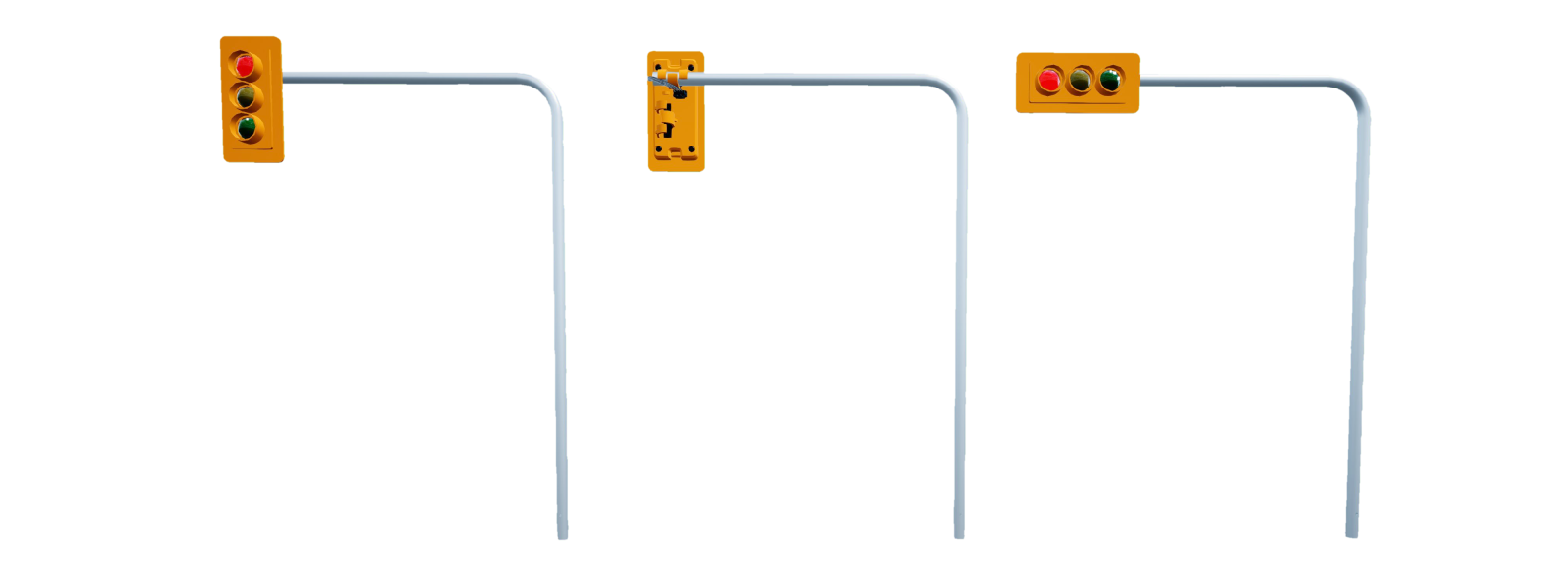
Connection Points
There are no connection points for this actor class.
Road Signage Tutorial
Example
  1"""
  2Road Signage Library Example
  3----------------------------
  4
  5.. note:: Make sure you have Quanser Interactive Labs open before running any of these examples.
  6
  7.. tip:: If you are struggling to get this example running check out our _Troubleshooting page.
  8
  9"""
 10
 11# imports to important libraries
 12import sys
 13import math
 14import time
 15sys.path.append('../libraries/')
 16
 17from library_qlabs import QuanserInteractiveLabs
 18from library_qlabs_free_camera import QLabsFreeCamera
 19from library_qlabs_crosswalk import QLabsCrosswalk
 20from library_qlabs_roundabout_sign import QLabsRoundaboutSign
 21from library_qlabs_yield_sign import QLabsYieldSign
 22from library_qlabs_stop_sign import QLabsStopSign
 23from library_qlabs_traffic_cone import QLabsTrafficCone
 24from library_qlabs_traffic_light import QLabsTrafficLight
 25
 26# set any of these flags to False if you don't want to see the output
 27CROSSWALK_FLAG = True
 28ROUNDABOUT_FLAG = True
 29YIELDSIGN_FLAG = True
 30STOPSIGN_FLAG = True
 31TRAFFICCONE_FLAG = True
 32TRAFFICLIGHT_FLAG = True
 33
 34def crosswalk(qlabs):
 35    """This method demonstrates some basic commands with the crosswalk class"""
 36
 37    # initialize a camera - See Camera Actor Library Reference for more information
 38    cameraCrosswalk = QLabsFreeCamera(qlabs)
 39    cameraCrosswalk.spawn(location=[-25.286, 46.167, 5.333], rotation=[-0, 0.239, -0.043])
 40    cameraCrosswalk.possess()
 41
 42    # create a crosswalk in this qlabs instance
 43    crosswalk = QLabsCrosswalk(qlabs)
 44
 45    # spawn crosswalk with radians in config
 46    crosswalk.spawn_id(actorNumber=0, location=[-15.788, 47.5, 0.00], rotation=[0,0,math.pi/2], scale=[1,1,1], configuration=0, waitForConfirmation=True)
 47    # waits so we can see the output
 48    time.sleep(1)
 49    # spawn crosswalk with degrees in config 1
 50    crosswalk.spawn_id_degrees(actorNumber=1, location=[-11.788, 47.5, 0.00], rotation=[0,0,90], scale=[1,1,1], configuration=1, waitForConfirmation=True)
 51    # waits so we can see the output
 52    time.sleep(1)
 53    # spawn crosswalk with degress in config 2
 54    crosswalk.spawn_id_degrees(actorNumber=2, location=[-7.8, 47.5, 0.0], rotation=[0,0,90], scale=[1,1,1], configuration=2, waitForConfirmation=True)
 55
 56    # collecting the world transform coordinates of the crosswalk
 57    x, loc, rot, scale = crosswalk.get_world_transform()
 58    print( x, loc, rot, scale)
 59
 60    # pinging existing sign - this should return True if we printed it
 61    crosswalk.ping()
 62
 63
 64
 65def roundabout_sign(qlabs):
 66    """This method demonstrates some basic commands with the roundabout sign class"""
 67
 68    # create two roundabouts in this qlabs instance
 69    roundabout = QLabsRoundaboutSign(qlabs)
 70    roundabout2 = QLabsRoundaboutSign(qlabs)
 71
 72    # spawns the sign we just created using radians and specifying the actorNumber
 73    roundabout.spawn_id(actorNumber=0, location=[-17, 36, 0.0], rotation=[0, 0, math.pi], scale=[1,1,1], configuration=0, waitForConfirmation=True)
 74    # spawns the second sign we just created using degrees and allowing the computer to
 75    # generate an actorNumber internally
 76    roundabout2.spawn_id_degrees(actorNumber=2, location=[-15, 36, 0.0], rotation=[0,0,180], scale=[1,1,1], configuration=0, waitForConfirmation=True)
 77
 78    # collecting the world transform coordinates of the roundabout sign
 79    x, loc, rot, scale = roundabout2.get_world_transform()
 80    print( x, loc, rot, scale)
 81
 82    # pinging existing sign - this should return True if we printed it
 83    roundabout2.ping()
 84    # waits so we can see the output
 85    time.sleep(1)
 86
 87    # destroying the sign we just created
 88    roundabout.destroy()
 89
 90
 91def yield_sign(qlabs):
 92    """This method demonstrates some basic commands with the yield sign class"""
 93
 94    # create two yieldsigns in this qlabs instance
 95    yieldsign = QLabsYieldSign(qlabs)
 96    yieldsign2 = QLabsYieldSign(qlabs)
 97
 98    # spawns the sign we just created using radians and specifying the actorNumber
 99    yieldsign.spawn_id(actorNumber=0, location=[-17, 38, 0.0], rotation=[0,0,math.pi], scale=[1,1,1], configuration=0, waitForConfirmation=True)
100    # spawns the second sign we just created using degrees and allowing the computer to
101    # generate an actorNumber internally
102    yieldsign2.spawn_degrees(location=[-15, 38, 0.0], rotation=[0,0,180], scale=[1,1,1], configuration=0, waitForConfirmation=True)
103
104    # collecting the world transform coordinates of the yield sign
105    x, loc, rot, scale = yieldsign2.get_world_transform()
106    print( x, loc, rot, scale)
107
108    # pinging existing sign - this should return "True" if we printed it
109    yieldsign2.ping()
110    # waits so we can see the output
111    time.sleep(1)
112
113    # destroying the sign we just created
114    yieldsign.destroy()
115
116
117def stop_sign(qlabs):
118    """This method demonstrates some basic commands with the stop sign class"""
119
120    # create two stop signs in this qlabs instance
121    stop = QLabsStopSign(qlabs)
122    stop2 = QLabsStopSign(qlabs)
123    # spawns the sign we just created using radians
124    stop.spawn_id(actorNumber=1, location=[-16, 37, 0.0], rotation=[0,0,math.pi], scale=[1,1,1], configuration=0, waitForConfirmation=True)
125    # spawns the second sign we just created using degrees and generating the actorNumber internally
126    stop2.spawn_degrees(location=[-15, 37, 0.0], rotation=[0,0,180], scale=[1,1,1], configuration=0, waitForConfirmation=True)
127
128    # collecting the world transform coordinates of the stop sign
129    x, loc, rot, scale = stop2.get_world_transform()
130    print(x, loc, rot, scale)
131
132    # pinging existing sign - this should return True if we printed it
133    stop2.ping()
134    # waits so we can see the output
135    time.sleep(1)
136
137    # destroying the sign we just created
138    stop.destroy()
139
140
141def traffic_cone(qlabs):
142    """This method demonstrates some basic commands with the traffic cone class"""
143
144    # creates 3 cones in this qlabs instance
145    cone = QLabsTrafficCone(qlabs)
146    cone1 = QLabsTrafficCone(qlabs)
147    cone2 = QLabsTrafficCone(qlabs)
148
149    # spawns a small traffic cone we just initialized using radians
150    cone.spawn(location=[-17, 35, 1.0], rotation=[0,0,math.pi], scale=[1,1,1], configuration=0, waitForConfirmation=True)
151    # waits so we can see the output
152    time.sleep (1)
153    # destroy the cone we just made
154    cone.destroy()
155    # waits so we can see the output
156    time.sleep(1)
157    # spawns another small traffic cone we just initialized using radians in the same place
158    cone1.spawn_id(actorNumber=1, location=[-17, 35, 1.0], rotation=[0,0,math.pi], scale=[1,1,1], configuration=0, waitForConfirmation=True)
159    # spawns a construction pylon using the cone we just initialized using degrees and generating
160    # the actorNumber internally
161    cone2.spawn_degrees(location=[-15, 35, 1.0], rotation=[0,0,180], scale=[1,1,1], configuration=1, waitForConfirmation=True)
162
163    # collecting the world transform coordinates of the traffic cone
164    x, loc, rot, scale = cone2.get_world_transform()
165    print(x, loc, rot, scale)
166
167    # pinging existing cone - this should return True if we printed it
168    cone2.ping()
169
170
171def traffic_light(qlabs):
172    """This method demonstrates some basic commands with the traffic light class"""
173
174    # initialize a camera - See Camera Actor Library Reference for more information
175    cameraTraffic = QLabsFreeCamera(qlabs)
176    cameraTraffic.spawn(location=[-6.891, 3.568, 2.127], rotation=[0, 0.049, 1.105])
177    cameraTraffic.possess()
178
179    # initialize three traffic light instances in qlabs
180    trafficLight = QLabsTrafficLight(qlabs)
181    trafficLight2 = QLabsTrafficLight(qlabs)
182    trafficLight3 = QLabsTrafficLight(qlabs)
183
184    # spawn a traffic light in config 1 - vertical using radians and specifying a specific actorNumber
185    trafficLight.spawn_id(actorNumber=0, location=[-0.044, 17.715, 0.215], rotation=[0,0,0], scale=[1,1,1], configuration=0, waitForConfirmation=True)
186    # spawn a second traffic light using degrees in config 1 - vertical and specifying a specific actorNumber
187    trafficLight2.spawn_id_degrees(actorNumber=2, location=[-8.455, 17.527, 0.215], rotation=[0,0,180], scale=[1,1,1], configuration=1, waitForConfirmation=True)
188    # spawn traffic light using degrees in config 2 - horizontal and generating the actorNumber internally
189    trafficLight3.spawn_degrees(location=[-0.195, 7.261, 0.215], rotation=[0,0,-90], scale=[1,1,1], configuration=2, waitForConfirmation=True)
190
191    # collecting the world transform coordinates of the traffic light
192    x, loc, rot, scale = trafficLight2.get_world_transform()
193    print(x, loc, rot, scale)
194
195    # pinging existing traffic light - this should return True if we printed it
196    trafficLight2.ping()
197
198    # changing the state of the traffic lights from green to red
199    trafficLight.set_state(state=trafficLight.STATE_GREEN, waitForConfirmation=True)
200    trafficLight2.set_state(state=trafficLight2.STATE_GREEN, waitForConfirmation=True)
201    trafficLight3.set_state(state=trafficLight3.STATE_RED, waitForConfirmation=True)
202
203    time.sleep(2)
204
205    trafficLight.set_state(state=trafficLight.STATE_YELLOW, waitForConfirmation=True)
206    trafficLight2.set_state(state=trafficLight2.STATE_YELLOW, waitForConfirmation=True)
207
208    time.sleep(1)
209
210    trafficLight.set_state(state=trafficLight.STATE_RED, waitForConfirmation=True)
211    trafficLight2.set_state(state=trafficLight2.STATE_RED, waitForConfirmation=True)
212
213    time.sleep(1)
214
215    trafficLight3.set_state(state=trafficLight3.STATE_GREEN, waitForConfirmation=True)
216
217    # destroying a traffic light
218    trafficLight.destroy()
219
220
221def main():
222
223    # creates a server connection with Quanser Interactive Labs and manages the communications
224    qlabs = QuanserInteractiveLabs()
225
226    print("Connecting to QLabs...")
227    # trying to connect to QLabs and open the instance we have created - program will end if this fails
228    try:
229        qlabs.open("localhost")
230    except:
231        print("Unable to connect to QLabs")
232        return
233
234    # destroying any spawned actors in our QLabs that currently exist
235    qlabs.destroy_all_spawned_actors()
236
237    if CROSSWALK_FLAG == True:
238        crosswalk(qlabs)
239        time.sleep(2)
240
241    # switch the camera angle from whatever it was previous to be able to see where we will be
242    # spawning the rest of the objects - see Camera Actor Library Reference for more information
243    if ROUNDABOUT_FLAG or YIELDSIGN_FLAG or STOPSIGN_FLAG or TRAFFICCONE_FLAG:
244        camera0 = QLabsFreeCamera(qlabs)
245        camera0.spawn(location=[-23.106, 37.257, 3.482], rotation=[0, 0.349, -0.04])
246        camera0.possess()
247
248        if ROUNDABOUT_FLAG:
249            roundabout_sign(qlabs)
250            time.sleep(1)
251
252        if YIELDSIGN_FLAG:
253            yield_sign(qlabs)
254            time.sleep(1)
255
256        if STOPSIGN_FLAG:
257            stop_sign(qlabs)
258            time.sleep(1)
259
260        if TRAFFICCONE_FLAG:
261            traffic_cone(qlabs)
262            time.sleep(1)
263
264    if TRAFFICLIGHT_FLAG:
265        traffic_light(qlabs)
266
267
268if __name__ == "__main__":
269    main()
270
271
272
273
274
275
276
277
278