QCars
Description
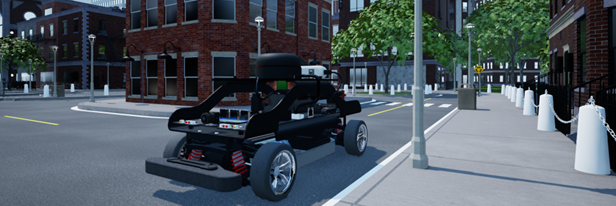
QCars are considered “actors” in the Virtual Self-Driving Car Studio. The QCar library can be used to acquire sensor data from the virtual environment and controls the motion of the vehicles.
See the QCar QCar Tutorial to get a better understanding of using QCars in Quanser Interactive Labs.
Library
Constants
- QLabsQCar.ID_QCAR = 160
Class ID
- QLabsQCar.CAMERA_CSI_RIGHT = 0
Image capture resolution: 820x410
- QLabsQCar.CAMERA_CSI_BACK = 1
Image capture resolution: 820x410
- QLabsQCar.CAMERA_CSI_LEFT = 2
Image capture resolution: 820x410
- QLabsQCar.CAMERA_CSI_FRONT = 3
Image capture resolution: 820x410
- QLabsQCar.CAMERA_RGB = 4
Image capture resolution: 640x480
- QLabsQCar.CAMERA_DEPTH = 5
Image capture resolution: 640x480
- QLabsQCar.CAMERA_OVERHEAD = 6
Note: The mouse scroll wheel can be used to zoom in and out in this mode.
- QLabsQCar.CAMERA_TRAILING = 7
Note: The mouse scroll wheel can be used to zoom in and out in this mode.
Member Variables
- QLabsQCar.actorNumber = None
The current actor number of this class to be addressed. This will be set by spawn methods and cleared by destroy methods. It will not be modified by the destroy all actors. This can be manually altered at any time to use one object to address multiple actors.
Methods
- QLabsQCar.__init__(qlabs, verbose=False)[source]
Constructor Method
- Parameters
qlabs (object) – A QuanserInteractiveLabs object
verbose (boolean) – (Optional) Print error information to the console.
- QLabsQCar.spawn(location=[0, 0, 0], rotation=[0, 0, 0], scale=[1, 1, 1], configuration=0, waitForConfirmation=True)
Spawns a new actor with the next available actor number within this class.
- Parameters
location (float array[3]) – (Optional) An array of floats for x, y and z coordinates
rotation (float array[3]) – (Optional) An array of floats for the roll, pitch, and yaw in radians
scale (float array[3]) – (Optional) An array of floats for the scale in the x, y, and z directions. Scale values of 0.0 should not be used.
configuration (uint32) – (Optional) Spawn configuration. See class library for configuration options.
waitForConfirmation (boolean) – (Optional) Make this operation blocking until confirmation of the spawn has occurred. Note that if this is False, the returned actor number will be invalid.
- Returns
status - 0 if successful, 1 class not available, 3 unknown error, -1 communications error.
actorNumber - An actor number to use for future references.
- Return type
int32, int32
- QLabsQCar.spawn_degrees(location=[0, 0, 0], rotation=[0, 0, 0], scale=[1, 1, 1], configuration=0, waitForConfirmation=True)
Spawns a new actor with the next available actor number within this class.
- Parameters
location (float array[3]) – (Optional) An array of floats for x, y and z coordinates
rotation (float array[3]) – (Optional) An array of floats for the roll, pitch, and yaw in degrees
scale (float array[3]) – (Optional) An array of floats for the scale in the x, y, and z directions. Scale values of 0.0 should not be used.
configuration (uint32) – (Optional) Spawn configuration. See class library for configuration options.
waitForConfirmation (boolean) – (Optional) Make this operation blocking until confirmation of the spawn has occurred. Note that if this is False, the returned actor number will be invalid.
- Returns
status - 0 if successful, 1 class not available, 3 unknown error, -1 communications error.
actorNumber - An actor number to use for future references.
- Return type
int32, int32
- QLabsQCar.spawn_id(actorNumber, location=[0, 0, 0], rotation=[0, 0, 0], scale=[1, 1, 1], configuration=0, waitForConfirmation=True)
Spawns a new actor.
- Parameters
actorNumber (uint32) – User defined unique identifier for the class actor in QLabs
location (float array[3]) – (Optional) An array of floats for x, y and z coordinates
rotation (float array[3]) – (Optional) An array of floats for the roll, pitch, and yaw in radians
scale (float array[3]) – (Optional) An array of floats for the scale in the x, y, and z directions. Scale values of 0.0 should not be used.
configuration (uint32) – (Optional) Spawn configuration. See class library for configuration options.
waitForConfirmation (boolean) – (Optional) Make this operation blocking until confirmation of the spawn has occurred.
- Returns
status - 0 if successful, 1 class not available, 2 actor number not available or already in use, 3 unknown error, -1 communications error
- Return type
int32
- QLabsQCar.spawn_id_degrees(actorNumber, location=[0, 0, 0], rotation=[0, 0, 0], scale=[1, 1, 1], configuration=0, waitForConfirmation=True)
Spawns a new actor.
- Parameters
actorNumber (uint32) – User defined unique identifier for the class actor in QLabs
location (float array[3]) – (Optional) An array of floats for x, y and z coordinates
rotation (float array[3]) – (Optional) An array of floats for the roll, pitch, and yaw in radians
scale (float array[3]) – (Optional) An array of floats for the scale in the x, y, and z directions. Scale values of 0.0 should not be used.
configuration (uint32) – (Optional) Spawn configuration. See class library for configuration options.
waitForConfirmation (boolean) – (Optional) Make this operation blocking until confirmation of the spawn has occurred.
- Returns
status - 0 if successful, 1 class not available, 2 actor number not available or already in use, 3 unknown error, -1 communications error
- Return type
int32
- QLabsQCar.set_transform_and_request_state(location, rotation, enableDynamics, headlights, leftTurnSignal, rightTurnSignal, brakeSignal, reverseSignal, waitForConfirmation=True)[source]
Sets the location, rotation, and other car properties. Note that setting the location ignores collisions so ensure that the location is free of obstacles that may trap the actor if it is subsequently used in a dynamic mode. This transform can also be used to “playback” previously recorded position data without the need for a full dynamic model.
- Parameters
location (float array[3]) – An array of floats for x, y and z coordinates in full-scale units. Multiply physical QCar locations by 10 to get full scale locations.
rotation (float array[3]) – An array of floats for the roll, pitch, and yaw in radians
enableDynamics (boolean) – (default True) Enables or disables gravity for set transform requests.
headlights (boolean) – Enable the headlights
leftTurnSignal (boolean) – Enable the left turn signal
rightTurnSignal (boolean) – Enable the right turn signal
brakeSignal (boolean) – Enable the brake lights (does not affect the motion of the vehicle)
reverseSignal (boolean) – Play a honking sound
waitForConfirmation (boolean) – (Optional) Wait for confirmation of the spawn before proceeding. This makes the method a blocking operation. NOTE: Return data will only be valid if waitForConfirmation is True.
- Returns
status - True if successful or False otherwise
location - in full scale
rotation - in radians
forward vector - unit scale vector
up vector - unit scale vector
front bumper hit - True if in contact with a collision object, False otherwise
rear bumper hit - True if in contact with a collision object, False otherwise
- Return type
boolean, float array[3], float array[3], float array[3], float array[3], boolean, boolean
- QLabsQCar.set_transform_and_request_state_degrees(location, rotation, enableDynamics, headlights, leftTurnSignal, rightTurnSignal, brakeSignal, reverseSignal, waitForConfirmation=True)[source]
Sets the location, rotation, and other car properties. Note that setting the location ignores collisions so ensure that the location is free of obstacles that may trap the actor if it is subsequently used in a dynamic mode. This transform can also be used to “playback” previously recorded position data without the need for a full dynamic model.
- Parameters
location (float array[3]) – An array of floats for x, y and z coordinates in full-scale units. Multiply physical QCar locations by 10 to get full scale locations.
rotation (float array[3]) – An array of floats for the roll, pitch, and yaw in degrees
enableDynamics (boolean) – (default True) Enables or disables gravity for set transform requests.
headlights (boolean) – Enable the headlights
leftTurnSignal (boolean) – Enable the left turn signal
rightTurnSignal (boolean) – Enable the right turn signal
brakeSignal (boolean) – Enable the brake lights (does not affect the motion of the vehicle)
reverseSignal (boolean) – Play a honking sound
waitForConfirmation (boolean) – (Optional) Wait for confirmation of the spawn before proceeding. This makes the method a blocking operation. NOTE: Return data will only be valid if waitForConfirmation is True.
- Returns
status - True if successful or False otherwise
location - in full scale
rotation - in radians
forward vector - unit scale vector
up vector - unit scale vector
front bumper hit - True if in contact with a collision object, False otherwise
rear bumper hit - True if in contact with a collision object, False otherwise
- Return type
boolean, float array[3], float array[3], float array[3], float array[3], boolean, boolean
- QLabsQCar.set_velocity_and_request_state(forward, turn, headlights, leftTurnSignal, rightTurnSignal, brakeSignal, reverseSignal)[source]
Sets the location, rotation, and other car properties. Note that setting the location ignores collisions so ensure that the location is free of obstacles that may trap the actor. This transform can also be used to “playback” previously recorded position data without the need for a full dynamic model.
- Parameters
forward – Speed in m/s of a full-scale car. Multiply physical QCar speeds by 10 to get full scale speeds.
turn (float) – Turn angle in radians. Positive values turn right.
headlights (boolean) – Enable the headlights
leftTurnSignal (boolean) – Enable the left turn signal
rightTurnSignal (boolean) – Enable the right turn signal
brakeSignal (boolean) – Enable the brake lights (does not affect the motion of the vehicle)
reverseSignal (boolean) – Play a honking sound
- Returns
status - True if successful, False otherwise
location
rotation - in radians
front bumper hit - True if in contact with a collision object, False otherwise
rear bumper hit - True if in contact with a collision object, False otherwise
- Return type
boolean, float array[3], float array[3], boolean, boolean
- QLabsQCar.set_velocity_and_request_state_degrees(forward, turn, headlights, leftTurnSignal, rightTurnSignal, brakeSignal, reverseSignal)[source]
Sets the location, rotation, and other car properties. Note that setting the location ignores collisions so ensure that the location is free of obstacles that may trap the actor. This transform can also be used to “playback” previously recorded position data without the need for a full dynamic model.
- Parameters
forward – Speed in m/s of a full-scale car. Multiply physical QCar speeds by 10 to get full scale speeds.
turn (float) – Turn angle in degrees. Positive values turn right.
headlights (boolean) – Enable the headlights
leftTurnSignal (boolean) – Enable the left turn signal
rightTurnSignal (boolean) – Enable the right turn signal
brakeSignal (boolean) – Enable the brake lights (does not affect the motion of the vehicle)
reverseSignal (boolean) – Play a honking sound
- Returns
status - True if successful, False otherwise
location
rotation - in radians
front bumper hit - True if in contact with a collision object, False otherwise
rear bumper hit - True if in contact with a collision object, False otherwise
- Return type
boolean, float array[3], float array[3], boolean, boolean
- QLabsQCar.possess(camera=CAMERA_TRAILING)[source]
Possess (take control of) a QCar in QLabs with the selected camera.
- Parameters
camera (uint32) – Pre-defined camera constant. See CAMERA constants for available options. Default is the trailing camera.
- Returns
status - True if possessing the camera was successful, False otherwise
- Return type
boolean
- QLabsQCar.ghost_mode(enable=True, color=[0, 1, 0])[source]
Ghost mode changes the selected QCar actor into a transparent colored version. This can be useful as a reference actor or indicating a change in state.
- Parameters
enable (boolean) – Set the QCar to the defined transparent color, otherwise revert to the solid color scheme.
color (float array[3]) – Red, Green, Blue components of the RGB color on a 0.0 to 1.0 scale.
- Returns
status - True if possessing the camera was successful, False otherwise
- Return type
boolean
- QLabsQCar.get_image(camera)[source]
Request a JPG image from one of the QCar cameras.
- Parameters
camera (uint32) – Pre-defined camera constant. See CAMERA constants for available options. Trailing and Overhead cameras cannot be selected.
- Returns
status - True and image data if successful, False and empty otherwise
imageData - Image in a JPG format
- Return type
boolean, byte array with jpg data
- QLabsQCar.get_lidar(samplePoints=400)[source]
Request LIDAR data from a QCar.
- Parameters
samplePoints (uint32) – (Optional) Change the number of points per revolution of the LIDAR.
- Returns
True, angles in radians, and distances in m if successful, False, none, and none otherwise
- Return type
boolean, float array, float array
- QLabsQCar.destroy()
Find and destroy a specific actor. This is a blocking operation.
- Returns
numActorsDestroyed - The number of actors destroyed. -1 if failed.
- Return type
int32
- QLabsQCar.destroy_all_actors_of_class()
Find and destroy all actors of this class. This is a blocking operation.
- Returns
numActorsDestroyed - The number of actors destroyed. -1 if failed.
- Return type
int32
- QLabsQCar.ping()
Checks if the actor is still present in the environment. Note that if you did not spawn the actor with one of the spawn functions, you may need to manually set the actorNumber member variable.
- Returns
status - True if successful, False otherwise
- Return type
boolean
- QLabsQCar.get_world_transform()
Get the location, rotation, and scale in world coordinates of the actor.
- Returns
status - True if successful, False otherwise
location
rotation
scale
- Return type
boolean, float array[3], float array[3], float array[3]
- QLabsQCar.get_world_transform_degrees()
Get the location, rotation, and scale in world coordinates of the actor.
- Returns
status - True if successful, False otherwise
location
rotation
scale
- Return type
boolean, float array[3], float array[3], float array[3]
Configurations
There is only one configuration of the QCar actor.
Connection Points
Reference Frame Number |
Parent Frame |
Relative Transform to Parent (Location, Rotation, Deg) |
Description |
|---|---|---|---|
0 |
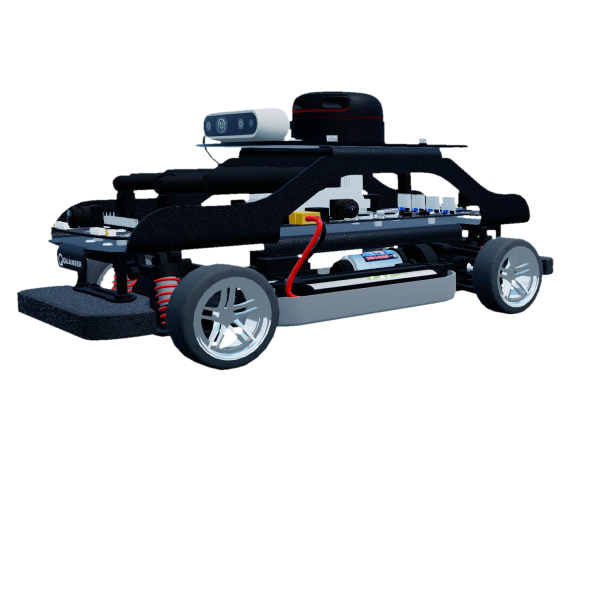
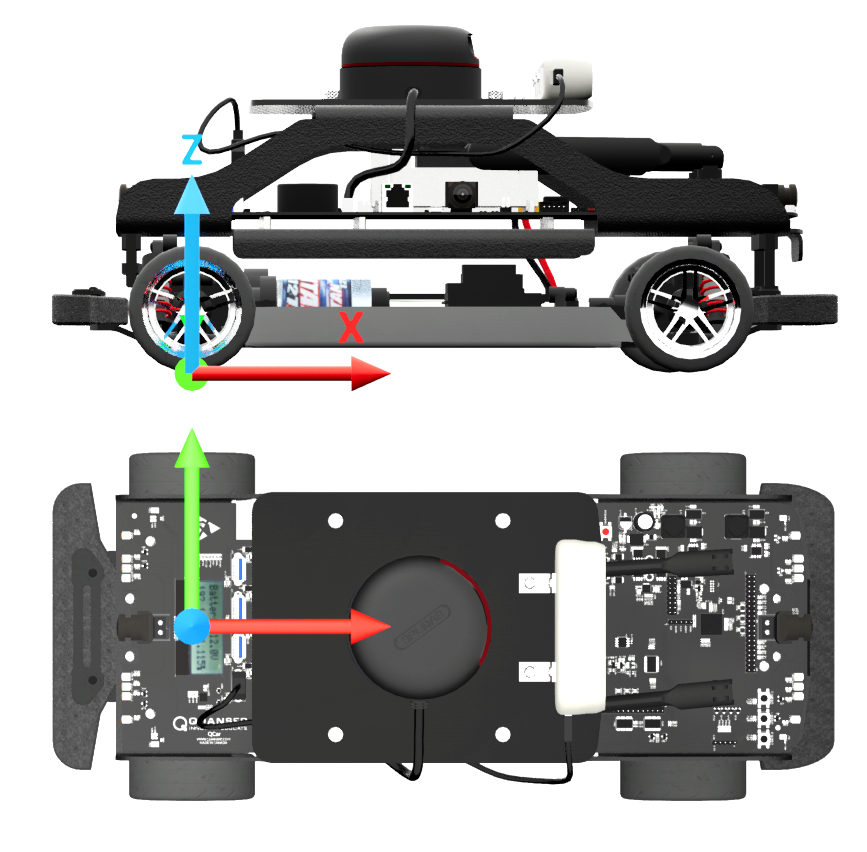
The base frame is located at ground level, centered between the two rear wheels. This represents the location of the car with no filtering, suspension, or dynamics. Collision detection is connected to this reference frame. |
||
1 |
0 |
[0,0,0] [0,0,0] |
The filtered frame is co-located with connection point 0, but it is a filtered position to simulated the suspension and dynamic effects. All the visual elements and sensors of the QCar are connected to this frame. |
Component Extrinsics
“Extrinsics” refer to the external relationship of an object with respect to a specific frame of reference (in this case the body center of the QCar). Sometimes it’s important to know specific distances and orientation of extrinsic components, for instance, this can be use for obstacle detection and camera calibration. You will find a list of the important extrinsics below.
Distances From Body Center
All distance in QCar’s virtual enviroment are 10 times larger then in real life. Therefore the distances to important components have been scaled appropriately below:
Component |
x (m) |
y (m) |
z (m) |
|---|---|---|---|
Front axle |
1.300 |
0 |
0.310 |
Rear axle |
-1.300 |
0 |
0.310 |
CSI front |
-1.930 |
0 |
0.953 |
CSI left |
0.140 |
0.438 |
0.953 |
CSI rear |
-1.650 |
0 |
0.953 |
CSI right |
0.140 |
-0.674 |
0.953 |
IMU |
1.278 |
0.223 |
0.895 |
RealSense |
0.822 |
0.003 |
1.582 |
RPLIDAR |
-0.108 |
-0.001 |
1.860 |
Transformation Matrices
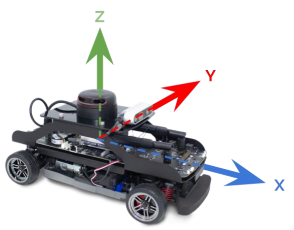
All transformation matrices are built off of the body frame and camera frames for the QCar. To read more about this check out our documentation here by clicking on resources button and looking inside the zip folder for User Guides/System Hardware.pdf
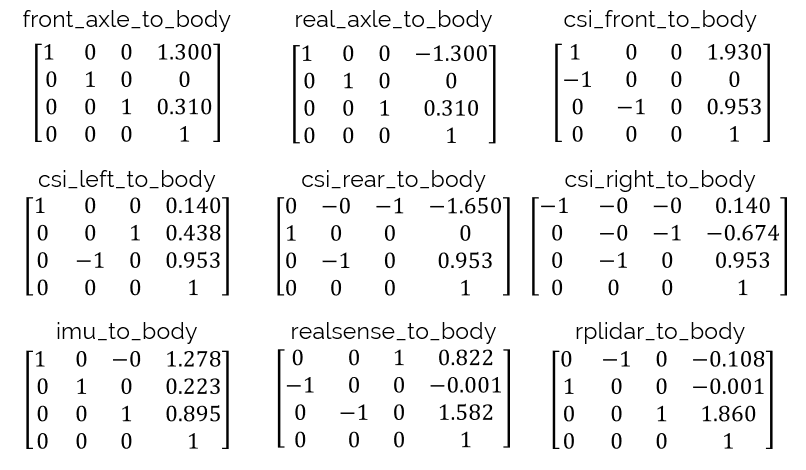
QCar Tutorial
Example
Coming Soon